


.png)



Most product work doesn't start with a clean request. It starts with a few people saying different things, a half-explained problem, and a deadline. The job of a product lead is to turn that mess into a product requirement document (PRD) , a document clear enough that engineers can start building from it on day one. If you're building an AI product specifically, this PRD step is just the first piece of a larger AI development process worth a look if you're mapping out the full lifecycle.
This guide walks through a simple, repeatable method for PRD development, using one real example from start to finish: a supply-chain tool where users wanted to edit their delivery network on a map instead of in spreadsheets. By the end, you'll also have a product requirement document template you can reuse on your next project.
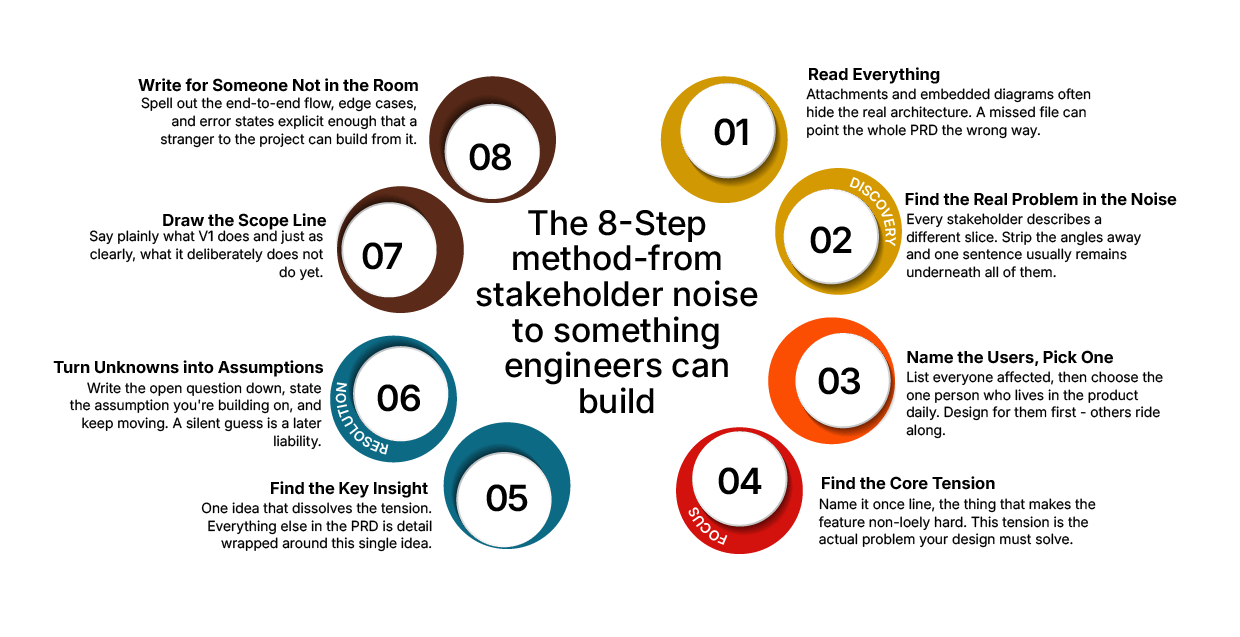
The 8-Step PRD Method
- Read everything, including what's hidden in attachments and diagrams.
- Find the real problem inside conflicting stakeholder opinions.
- Name the users, then pick the one primary user to design for.
- Name the core tension that makes the feature hard.
- Find the one insight that resolves that tension.
- Turn unknowns into stated assumptions, not silent guesses.
- Draw the scope line, what's in, what's out.
- Write it so someone who wasn't in the room can build it.
Below, each step is broken down with the real example that shaped it, plus a template you can copy for your own PRD development work.
The Brief I Was Handed
Before the method, here's the actual request that kicked off this PRD:
- The product. A supply-chain optimization tool. Companies map their network, such as factories, warehouses, customers, and the transport routes between them and an optimizer automatically assigns each customer to its cheapest warehouse. Teams then compare "what-if" scenarios against a baseline.
- The problem. The optimizer only cares about cost. But real life has rules it doesn't know: "this customer must be served from the southern warehouse," "this region is locked to a partner." So the cheapest answer is often wrong in practice, and clients reject it. Today, consultants fix this by editing tables one customer at a time, a slow, painful process.
- The ask. Let consultants edit on the map instead: select a group of customers, say "serve these from Warehouse B," create a new scenario, and instantly see the effect on cost and service.
- The catch. Whatever changes on the map must still produce a valid optimization run. The math engine is strict a bad edit can't be allowed to break it.
That raw brief is the starting point. The rest of this guide is how it became a working product requirement document.
Step 1: Read Everything
A brief is rarely just the words on the page. There are attachments, diagrams, and system details that change how you think about the problem and they're easy to miss.
In practice, the brief pointed to a "technical architecture," but at first glance, there seemed to be no diagram at all. It turned out to be a file embedded inside the document that most viewers never open. Inside it were the pieces that mattered: an existing map component, a scenario manager, and a strict optimization engine.
That one hidden file changed everything. It reframed the task from "build a map from scratch" to "connect things that already exist" a far smaller and more precise problem.
Lesson: Before you design anything, make sure you've actually seen the whole input. Missing a single embedded file can lead an entire PRD in the wrong direction.
Step 2: Find the Real Problem Inside the Noise
When several people describe a problem, they each see a different slice of it. Your job in early PRD development is to find the one underlying need they're all circling.
In practice, four people said four different things:
- A consultant: "The tool picks the cheapest option, but real-world rules make it wrong, and fixing it by hand takes forever."
- A salesperson: "The map is where we win demos."
- A delivery lead: "Fine, but any edit still has to produce a valid result."
- The consultant, again: "So the edit should create a fresh, valid version to compare."
Strip away the angles, and the real problem is one sentence: people need a fast, visual way to override the tool's decisions without breaking the math behind it.
Lesson: Don't design for four opinions. Find the single problem underneath them.
Step 3: Name the Users and Select the Right One
A feature that tries to serve everyone equally usually serves no one well. Write down who the users are, then choose the primary one. This focus also leads to stronger product design, because effective UI/UX can become a growth engine when it is built around the needs of a clearly defined user rather than a broad, undefined audience.
In practice: the salesperson and the client both mattered, but the person who lives in this tool every day is the consultant. So the design was built for the consultant first the demo experience simply rides on the same flow. That single decision made every later trade-off easier, because there was no longer a question of "whose needs win" when two use cases pulled in different directions.
Lesson: One primary user makes every later decision in your PRD easier to make and easier to defend.
Step 4: Find the Core Tension
Every interesting feature has a tension that makes it genuinely hard to build. Name it clearly, because your best idea will be the one that resolves it.
In practice, the tension was sharp:
- People want to edit freely on the map.
- The math engine is strict and a careless edit could make it impossible to run.
Freedom vs. strictness. Ignore either side and the feature fails: either it's rigid and useless, or it's flexible and broken. Skipping this step is exactly how logistics platforms fail under real-time pressure or financial apps break at scale. Someone shipped the freedom without ever naming the constraint it was fighting against.
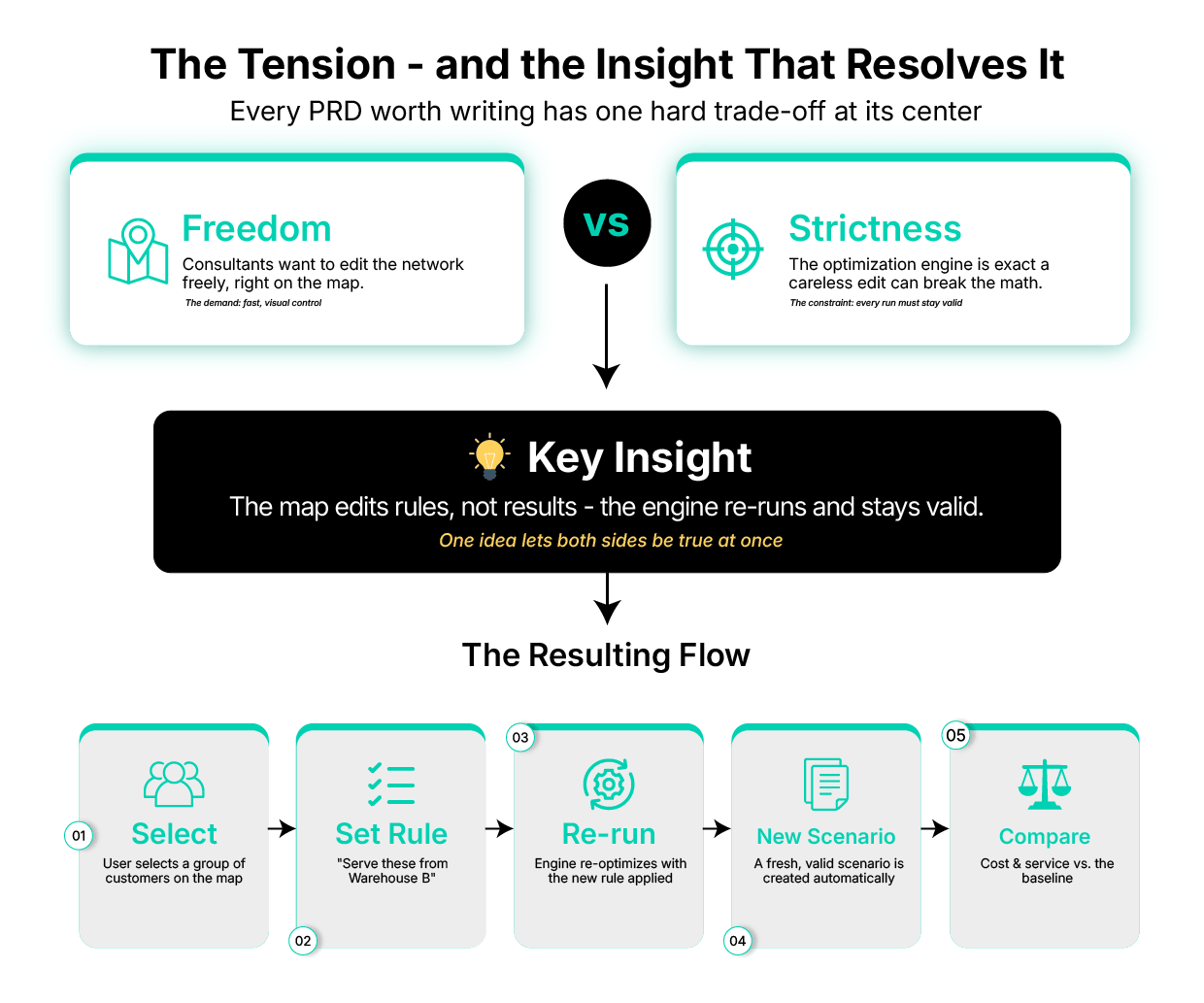
Lesson: Write the tension down in one line. It's the actual problem your design has to solve not the feature list, the tension.
Step 5: Find the Key Insight That Resolves It
This is the main part of any product requirement document: one idea that makes the tension disappear.
In practice, the insight was a small shift in what an "edit" means:
The map edits rules, not results.
When a user drags customers to a different warehouse, they aren't hand-writing the final answer. They're adding a rule ("serve these from here"). The system feeds that rule back into the strict engine, which re-runs and fills in everything else automatically.
Everything else in the PRD is detail built around this core idea, helping translate product logic into clearer implementation decisions that support the broader path from development and deployment to business value.
A Simplified Version of the Flow this Insight Produces:

Lesson: A strong PRD usually rests on a single clear insight. Find it before you write requirements otherwise you're just listing features without a spine to hold them together.
Step 6: Turn Unknowns Into Assumptions
You'll never have every answer during PRD development. The mistake is to quietly guess and let that guess slip into the document unlabeled. The professional move is to write the question down, state the assumption you're building on, and keep moving the same discipline covered when you check your data requirements before building.
In practice, there were real open questions:
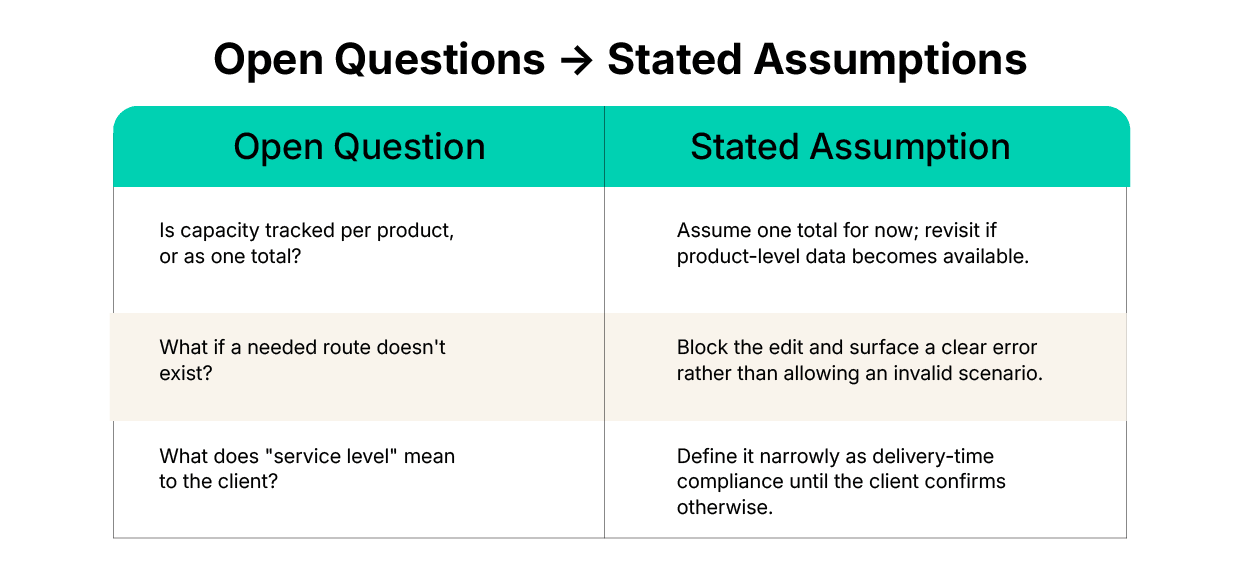
Nothing was hidden, and nothing was silently decided. Anyone reading the PRD could see exactly where the document was making a judgment call versus stating a confirmed fact.
Lesson: An open question with a stated assumption is a strength. A silent guess is a liability that surfaces late usually during development, when it's expensive to fix.
Step 7: Draw the Line Between In and Out
Scope is a decision, not a wish list. Say plainly what the first version does and, just as important, what it deliberately doesn't. This same discipline can also help businesses evaluate custom development against off-the-shelf solutions. When standard software cannot accommodate a company’s specific requirements, a clear PRD can define the scope and clarify what a custom solution needs to deliver.
In practice:
In scope:
- Select customers on the map
- Reassign them to a different warehouse
- Validate that the reassignment can be run
- Create a new, valid scenario
- Compare cost and service against the baseline
Out of scope (for now):
- Moving warehouses themselves
- Editing transport routes
- Multiple people editing the same scenario at once
Vague scope is also a common thread behind legacy system integration challenges and why e-commerce platforms hit scaling walls. Naming the "out" list explicitly is what keeps a project honest and it's often the single most useful section for engineering, because it prevents scope creep mid-build.
Lesson: A clear "not now" is worth as much as a clear "yes."
Step 8: Write It So Someone Else Can Build It
The final test of any product requirement document is simple: could an engineer who wasn't in any of your meetings build from this alone?
That means the finished PRD needs to be explicit about:
- The problem is stated in simple words
- The primary user and why they were chosen over others
- The core interaction: the exact flow, step by step
- What's in and out of scope with no ambiguity
- How it behaves end to end, including edge cases and error states
In practice, that meant spelling out the whole flow — select → edit → check → create scenario → run → compare along with the safety rules that keep every run valid, written in simple words anyone on the team could follow without needing a walkthrough. Those release-criteria rules are also exactly where QA testing starts knowing what "valid" means before you start testing.
Lesson: A PRD isn't done when you understand it. It's done when someone who wasn't there can pick it up and build from it correctly.
Mapping the Method to a Standard PRD Structure
If you need to present this method inside a more conventional format, the kind expected by engineering leads or stakeholders used to a fixed template, it maps cleanly onto four standard sections used across most product requirement document templates:
- Purpose → Steps 1–4 (the problem, the users, the tension)
- Features → Steps 5–7 (the key insight, assumptions, and scope)
- Release Criteria → the validation rules that keep every optimization run valid
- Timeline → milestones for design, engineering handoff, and testing
You don't need to abandon the narrative approach to satisfy this structure; the eight steps above simply need to be organized under these four headers when you write the final document.
A Simple Product Requirement Document Template
Use this as a starting skeleton for your own PRD development:
1. Problem Statement
- What problem are we solving, in plain language?
- Who experiences this problem?
- Why does solving it matter to the business?
2. Primary User
- Who is this built for first?
- Who else benefits, secondarily?
3. Core Tension
- What makes this hard? (one sentence)
4. Key Insight
- What single idea resolves the tension?
5. Scope
- In scope: ...
- Out of scope (for now): ...
6. Open Questions & Assumptions
- Question | Assumption
7. End-to-End Flow
- Step-by-step interaction, including edge cases and errors
8. Release Criteria
- What must be true before this ships?
Copy this structure directly, or adapt the headers to match your team's existing tools.
Common Mistakes to Avoid in PRD Development
- Designing for every stakeholder opinion at once, instead of finding the one problem underneath them (Step 2).
- Skipping the "core tension" step and jumping straight to features this usually produces a document with no clear reason for its own decisions.
- Guessing silently instead of writing down assumptions (Step 6) this is the most common source of late-stage rework.
- Leaving scope open-ended rather than stating a clear "in" and "out" list (Step 7).
- Writing for people already in the room, rather than for someone encountering the problem for the first time (Step 8).
Closing Thought
A vague brief isn't a problem to complain about it's the actual job. The value a product lead adds is turning that fog into something clear enough to build. That clarity, expressed through a well-structured product requirement document, is the product lead's craft.
.png)

Agile product development is no longer optional; it’s essential for businesses that want to compete in a fast-changing economy.
