
How to Sync Data Between Your App and CRM Without Losing Records
.png)

Connecting an app to a CRM is rarely the hard part. The hard part begins a week later, when a customer updates their email in your app, a sales rep edits the same contact in the CRM, a webhook fails halfway through delivery, and an API request times out after the CRM has already saved the record.
Now you have a different question: Which version of that customer is correct?
This is why reliable CRM data sync is not simply about moving data from System A to System B. It is about making sure every create, update, retry, deletion, and failure can be recovered without silently dropping information or creating duplicates.
The problem grows more important as tech stacks expand. MuleSoft's 2026 Connectivity Benchmark says the average organization manages 957 applications, yet only 27% are connected. IT teams also report spending around 36% of their time designing, building, and testing custom integrations.
Data quality also carries a business cost. In Validity's 2025 study of 602 CRM users and stakeholders, 37% said their company had lost revenue because of poor data quality, while 76% said less than half of their organization's CRM data was accurate and complete. This blogwalks through exactly how to connect your app to your CRM and keep it that way without waking up to duplicate leads, silently dropped updates, or a support ticket asking.
.png)
Why CRM Integration Data Loss Happens
When people hear “data loss,” the common image is that data is deleted permanently. In integrations, the failure is usually quieter.
Imagine a SaaS application where Customer 4812 changes her phone number from 555-0141 to 555-0188. The app sends the update to the CRM, but the API call times out. Your integration assumes it failed and sends the same request again.
If the operation is designed properly, nothing bad happens. If it is not, you might end up with two customer records.
Now imagine the original call actually succeeded, but your app never received the success response. This is one of the reasons duplicate records in CRM sync workflows are not always caused by dirty source data. Sometimes they are created by perfectly reasonable retry logic implemented without idempotency.
Other failures are just as subtle. One system may overwrite a newer value with an older one. A contact may arrive before its parent company exists. An API rate limit may stop the middle of a batch. A deleted CRM contact may remain active in the app indefinitely.
One-Way vs. Two-Way CRM Sync: Know Which One You're Building
This decision shapes everything else, so it's worth getting straight early.
One-way sync pushes data in a single direction, from your app into the CRM. It's simpler to reason about and lower-risk, but it means any manual edit a sales rep makes directly in the CRM can get overwritten the next time your app pushes an update.
Two-way CRM sync means both systems can create or update records, and changes flow in both directions. This is what most growing teams actually want. A rep updates a deal stage in the CRM, and your app reflects it instantly, or vice versa. But two-way sync is where most of the real complexity lives, because now you need a plan for what happens when both sides change the same record at nearly the same time.
If you're building or evaluating real-time CRM integration, here you can decide which is best: one-way is a good starting point, but two-way is usually where the actual business value is. And where you need to be the most deliberate about architecture.
Which CRM Sync Method Should You Use?
The right sync method depends on how quickly the business needs data and how damaging a missed update would be. Most production systems are safer with a hybrid model: an initial bulk sync, real-time events for ongoing changes, and scheduled reconciliation as a backup.
There are three common approaches.
A real-time CRM integration is useful when delays matter. Think about an inbound lead. If a new enterprise lead enters your product at 10:03 a.m., the sales team probably should not wait until midnight for the CRM to learn about it.
But real-time does not automatically mean reliable.
HubSpot, for example, documents retry behavior for failed webhook deliveries. That is helpful for reliability, but it also means your system must be prepared to process repeated notifications without creating repeated business actions.
Salesforce takes a similar resilience approach with event replay. Change Data Capture events are retained for 72 hours, and consumers can save a Replay ID and retrieve missed events after reconnecting within that retention window.
The stronger architecture therefore looks like this:
Historical backfill → live changes → retry queue → reconciliation
The live feed gives you speed. The reconciliation job gives you confidence.
How Do You Set Up CRM Data Sync Without Losing Records?
The safest setup can be broken into eight practical steps.
Let's discuss each one:
Step 1: Define a Source of Truth Before You Sync Anything
Do not begin a two-way sync until you know which system owns each important field. A SaaS company might use its application as the source of truth for subscription data but use its CRM as the source of truth for sales information.
For example:
This field-level approach is safer than simply saying, “The CRM always wins.” Imagine a salesperson accidentally changes subscription status from “Active” to “Canceled” while updating a Contact. Should the CRM now cancel the customer's product access? Probably not. That is why you should decide ownership at the field level whenever possible.
Step 2: Give Every Record an Identifier That Will Not Change
A dependable CRM data sync needs a stable cross-system key. Email addresses, names, and phone numbers are useful attributes, but they should not be your only permanent identity mechanism.
· People change email addresses.
· Companies change domains.
· Phone numbers get replaced.
· Names are not unique.
· Instead, the application might assign:
· customer_id = cus_48129
The CRM stores the same value in an external ID field.
Now both systems know:
App cus_48129 = CRM Contact 829105
This is one of the most important safeguards against duplicate records CRM sync errors. Salesforce specifically recommends upsert() for many integration scenarios because it can create a record when an external ID does not exist or update the existing record when that ID already matches. Salesforce notes that this helps prevent unwanted duplicates.
In other words, the integration should ask:
“Make customer cus_48129 look like this.”
not:
“Create another contact called Sarah Ahmed.”
That difference is small in code but enormous in data quality.
Step 3: Complete CRM Field Mapping Before Turning the Sync On
CRM field mapping defines how fields, formats, allowed values, and relationships in your app correspond to fields in the CRM. Mapping errors are especially dangerous because the API call can succeed while the business meaning becomes wrong.
Suppose your app stores:
status = trial_paused
but the CRM allows only:
- Active
- Trial
- Cancelled
Where should trial_paused go? Or suppose the app stores a timestamp:
2026-09-18T08:24:16Z
while the CRM field accepts only a date. Technically, both fields may be called “Signup Date.” They still behave differently.
Your CRM field mapping sheet should document at least:
- Source field
- Destination field
- Data type
- Required/optional status
- Allowed values
- Transformation rule
Relationships need their own mapping too. A typical CRM structure might be:
Company → Contact → Deal → Activity
If an Activity arrives before the Contact reference, you need to queue it until the parent record exists rather than silently dropping the association. The same principle appears in strong CRM data migration best practices: preserve original IDs, understand dependencies, and move related records in a controlled order rather than treating every CSV row as independent data.
Step 4: Make API Writes Safe to Repeat
This is where many integrations fail. Picture the following event. At 11:42:10, your app sends:
Create customer cus_48129
The CRM successfully creates the record. At 11:42:11, the network drops before your server receives the success response.
From the app's perspective, the outcome is unknown. So it is retrieved. If the integration performs another blind creation, you may now have two customers. If it performs an idempotent upsert using cus_48129, the CRM finds the record it already created and updates that record instead. Idempotency means repeating the same operation does not create a new unintended result.
For a production API integration with CRM, use combinations of:
- External IDs
- Unique fields
- Upserts
- Event IDs
- Processed-event tables
- Duplicate request detection
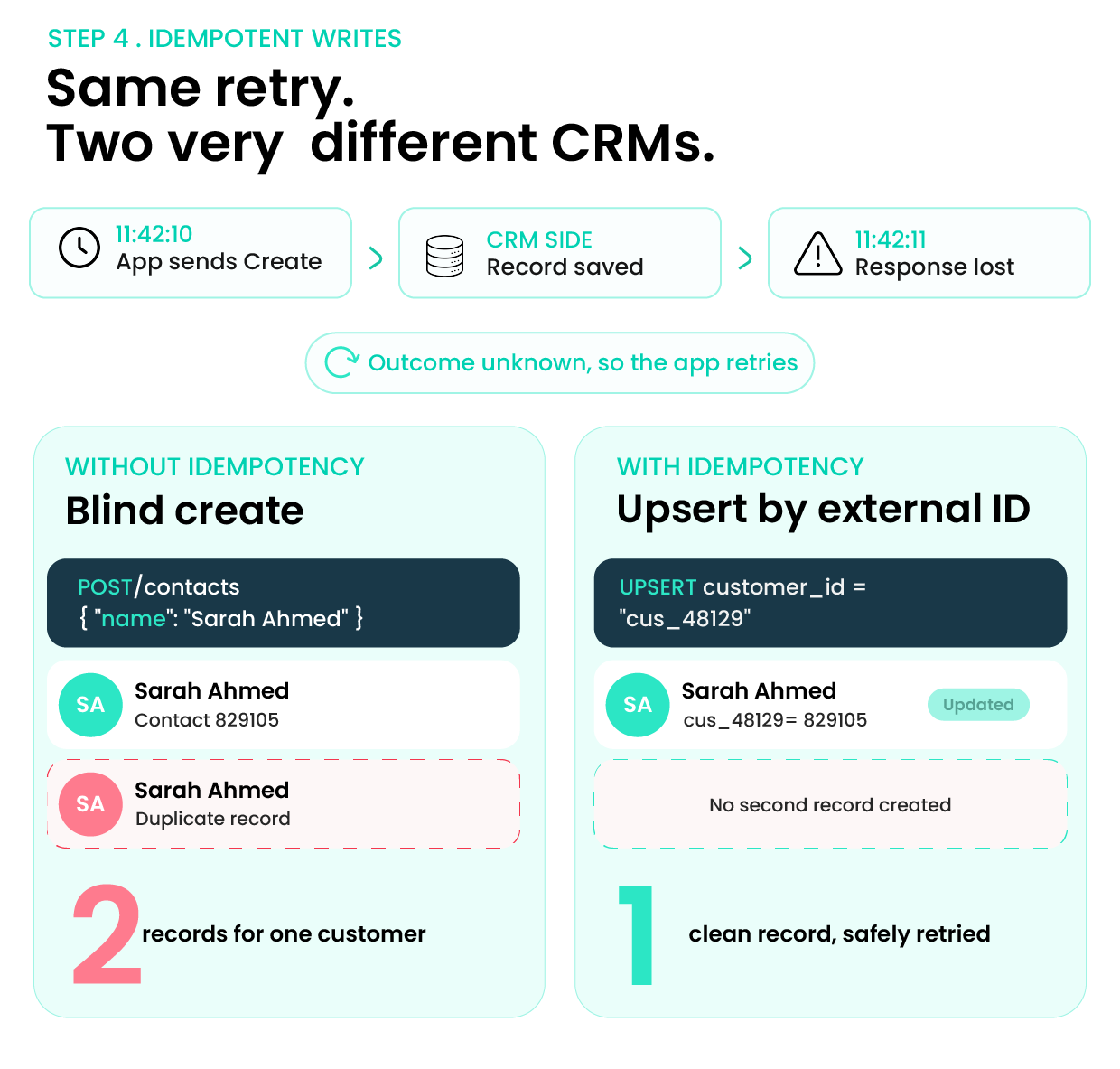
Salesforce explicitly describes upsert as an idempotent way to avoid unwanted duplicate records. This is why retry logic and duplicate prevention cannot be designed separately. A system that retries safely needs a way to recognize that it has seen the same business event before.
Step 5: Decide CRM Sync Conflict Resolution Rules in Advance
CRM sync conflict resolution determines what happens when both systems change the same information before either has received the other's update. Consider this example. At 2:00:03 p.m., a customer updates her phone number in the app. At 2:00:05 p.m., a salesperson enters a different number in the CRM from an older contact sheet.
Both changes are legitimate API events. Which should win?
There are several possible policies:
- App always wins for that field
- CRM always wins
- Latest valid update wins
- A version number determines which record is newer
- Sensitive conflicts go to manual review
“Last write wins” sounds convenient, but it is not always safe. The newest value can still be the wrong value. That is another reason field ownership is powerful: if the app owns subscription status and the CRM owns the deal stage, those two fields never need to compete. For genuinely shared fields, keep metadata such as:
updated_at
updated_by
version
source_system
That gives the integration context instead of forcing it to guess.
Step 6: Retry Temporary Failures Without Retrying Everything Forever
Temporary failures should be retried. Permanent data errors should be isolated and fixed. Treating both the same can create an endless backlog or cause records to disappear from the sync.
An HTTP 429 usually means the integration has reached a rate limit. A 5xx response may indicate a temporary server problem. A validation error saying “required field missing” will probably not fix itself after waiting 30 seconds. A safer processing pattern is:
Receive → Validate → Queue → Send → Retry temporary errors → Isolate persistent errors
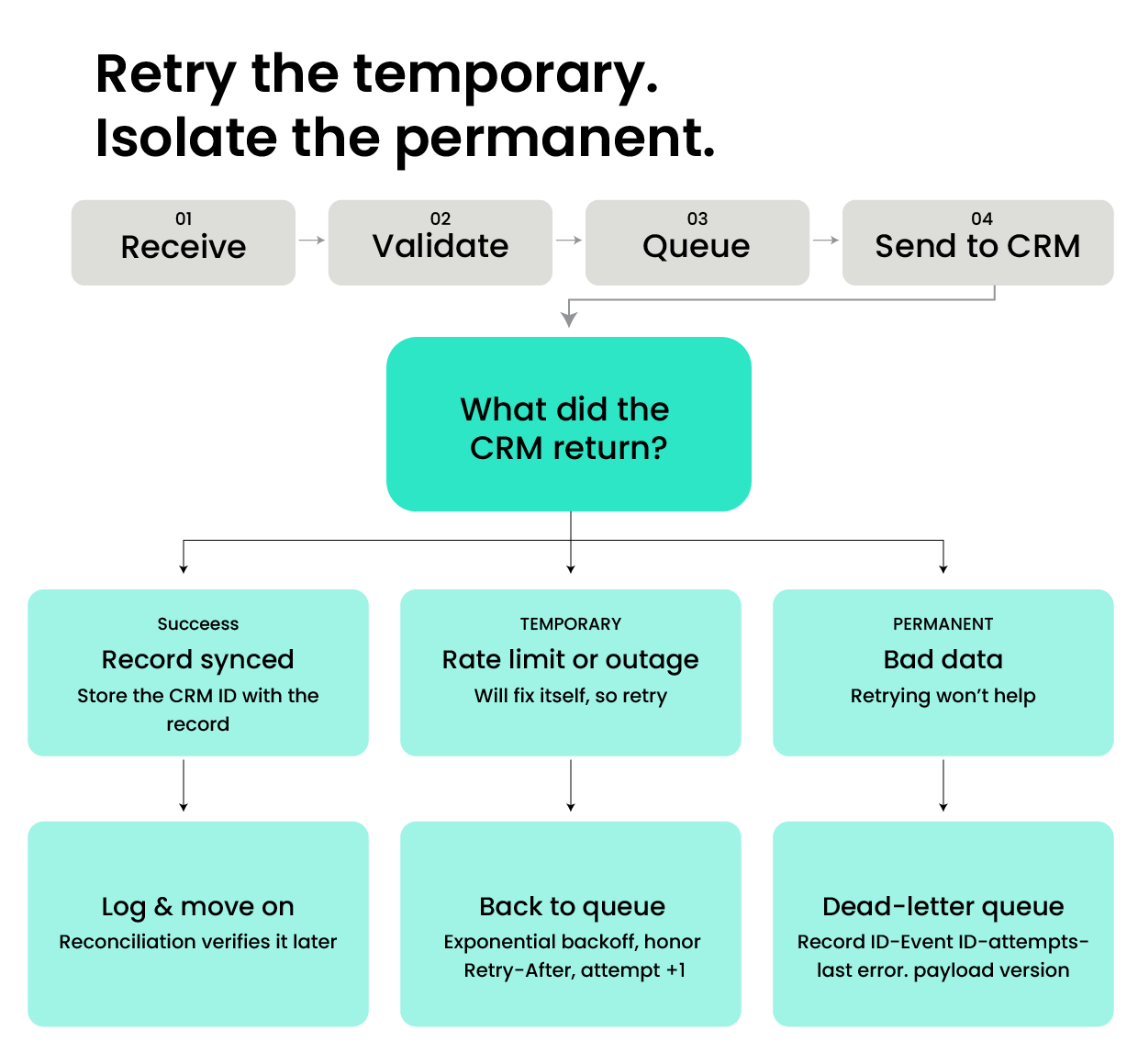
HubSpot's current developer guidance recommends respecting Retry-After for rate limiting and using exponential backoff rather than aggressively retrying requests. It also recommends making operations idempotent so a timeout retry does not accidentally create duplicate CRM records.
Failed records should remain visible in a retry or dead-letter queue with information such as:
- Record ID
- Event ID
- Timestamp
- Attempt count
- Last error
- Payload version
A log saying “sync failed” is not recovery. Recovery means you can identify the record, understand why it failed, and safely send it again.
Step 7: Treat Deletes and Merges as Data Changes Too
Most integrations are built around:
Create → Update
But CRM records also get:
Deleted → Archived → Restored → Merged
Suppose two duplicate contacts are merged inside the CRM. Your application still references the CRM ID of the record that no longer exists. What happens during the next update? Without merge handling, the app may fail the write or recreate the contact you just removed.
The same applies to deletion. If someone deletes a CRM Contact, should that delete the actual customer account in your product? Usually, that decision needs more thought. For important records, consider using a soft-delete or archived state and define deletion propagation rules separately from ordinary updates.
Step 8: Reconcile Both Systems Even When the Sync Looks Healthy
This is the layer that turns a working integration into a trustworthy one. Imagine your monitoring dashboard says:
99.9% sync success
Looks great.
But your app contains 81,206 active customers, while the CRM contains only 81,197 records with valid app IDs. You still have nine records to investigate. A reconciliation job independently compares the two systems and looks for:
- Missing IDs
- Duplicate IDs
- Unexpected value differences
- Orphaned relationships
- Records stuck in retry
- Records that have not synced recently
This catches failures that normal event monitoring can miss. Think of reconciliation as accounting for your integration. Your webhook tells you what should have happened. Reconciliation tells you what actually exists.
How Should You Backfill Existing CRM Data Before Live Sync?
Backfill exists before enabling normal real-time events, but capture changes that occur during the backfill window so nothing falls between the historical load and the live sync.
A safe sequence is:
- Back up the source data.
- Clean obvious duplicates.
- Finalize CRM field mapping.
- Assign or preserve stable external IDs.
- Record the starting checkpoint.
- Load parent records before dependent records.
- Import historical data.
This is where CRM data migration best practices directly overlap with integration architecture. The dangerous moment is the transition. If your historical export starts at 9:00 a.m. and finishes at 11:30 a.m., customers have not stopped changing their profiles during those two and a half hours.
How Do You Test CRM Sync Before Production?
Test the failure paths, not just successful contact creation. If your test environment proves only that one valid Contact can move from the app into the CRM, you have tested the easiest 5% of the integration. Run scenarios like these:
A current implementation detail makes validation especially important. As of HubSpot's 2026-09 API version, CRM API writes can be subject to administrator-configured validation rules such as required properties and association permissions. An integration that assumes “the API accepted this yesterday, so it always will” can therefore fail when CRM rules change.
Final Takeaway
A reliable CRM data sync is not just about connecting two systems and moving records from one place to another. The real challenge is keeping that data accurate, consistent, and recoverable as both your app and CRM continue to change.
Stable record IDs, clear ownership rules, careful CRM field mapping, conflict resolution, and regular reconciliation all help prevent duplicate or overwritten records. Just as importantly, your integration should be designed for failure, because API timeouts, missed events, and user changes are part of real-world systems.
At Amrood Labs, we approach CRM integrations with reliability and long-term scalability in mind. Whether you are building a real-time CRM integration, migrating existing customer data, or connecting a custom application through APIs, the goal should remain the same: create a sync process your team can trust as your data and business grow.
FAQs;
How to sync data between two systems without duplicates?
Give every record a stable unique identifier and use that identifier for upsert operations instead of blindly creating a new record each time an event arrives. Make event processing idempotent so receiving or retrying the same request does not create another record. Duplicate detection inside the CRM can provide another layer of protection; Salesforce, for example, supports matching and duplicate rules for identifying or blocking duplicate records.
What is two-way CRM sync?
Two-way CRM sync means changes can travel in both directions for example, from your application to the CRM and from the CRM back to the application. Because both systems may modify the same information, a reliable two-way integration also needs field ownership, loop prevention, stable IDs, and clear CRM sync conflict resolution rules.
How do you prevent data loss during CRM integration?
Prevent CRM integration data loss by combining several safeguards rather than relying on a single technique: preserve immutable record IDs, validate field mappings, use idempotent writes, queue failed requests, retry temporary errors, maintain checkpoints for event streams, record audit information, define deletion behavior, and run reconciliation jobs that compare the source and destination after synchronization.
How often should CRM data sync run?
The right frequency depends on how quickly the business needs a change. Lead routing, account ownership changes, and customer-facing workflows may justify near-real-time synchronization through webhooks or change events. Reporting or low-priority enrichment may only need scheduled batches. For many applications, the safest design is a hybrid: real-time CRM integration for operational changes plus a scheduled reconciliation job to detect missed or inconsistent records.
Table of Content
Share Now
.png)



Learn an 8-step method to convert vague product briefs into clear PRDs. Includes real supply-chain example, core tension analysis, scope definition, and a reusable PRD template.

Agile product development is no longer optional; it’s essential for businesses that want to compete in a fast-changing economy.

