Git Branching Strategies Explained: GitFlow vs Trunk-Based Development






When working on building software, many developers are familiar with the challenges of merging and branching code and maintaining it until it is released. That’s where a version control system comes in. It simply tracks project history and merges the changes made by multiple teams.
Also, it allows several developers to work on different parts of the same project and later combine their results into a single product. In this article, we will go through the two top branching models in software development
- Git Flow: a structured, multi-branch model built around planned releases.
- Trunk-Based Development (TBD): a single shared branch that every developer integrates into continuously.
The right option depends on how you ship, how many versions there are, which you support, and how fast your team is at testing changes.
Gitflow vs Trunk-Based Development at a Glance
Both Git branching strategies can use pull requests and automated tests. They differ in when your developers and QA testers first see feature changes running together.
Here is how the two models compare on the points that matter most to delivery teams.
What is Branching in Version Control?
Git branching strategy is a powerful tool that provides a dedicated space for developers to work on their code before merging it into the main branch. It mostly answers three questions:
1. At which points do changes start?
2. How long can a branch live?
3. What is the process of reaching code to production?
One of the most important features is that it lets teams develop on separate branches, fix bugs, and do other tasks independently without disrupting the existing branch. But there is a difference between branching and merging.
This is a confusing term that developers sometimes mix up. Merging can significantly impact your team's productivity and time to market. A well-planned branching strategy can reduce confusion and ensure timely releases.
What Is Git Flow?
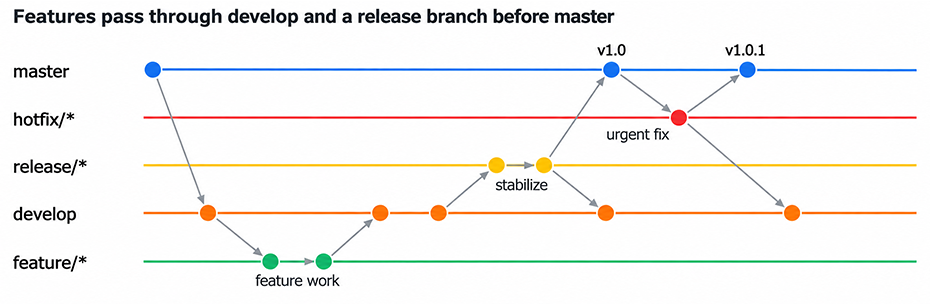
Git Flow is a branching model that Vincent Driessen published in 2010 in his blog post "A successful Git branching model." It organizes the whole task around two long-running branches along with three temporary support branches. And each one has a specific task to do:
Git Flow Workflow Diagram
Features wait on develop, a release branch stabilizes them, and only then does code reach master. Hotfixes are the one path that skips the queue.
How It Works
- Each new piece of work starts as a feature/* branch taken from develop.
- When the feature is finished and reviewed, it's merged back into develop.
- Once develop has enough for a release, the team branches release/* from it. New features stop flowing into that release.
- While QA runs, the release branch only accepts bug fixes, documentation, and version bumps.
- When the release is approved, it's merged into master and tagged with a version number. It's also merged back into develop so the fixes aren't lost.
- If production breaks, a hotfix/* branch is cut from master. Once fixed, it's merged into master (with a new tag) and into develop.
The core idea: work stays separate until it's complete. Integration happens late, in big pieces.
git flow init
git flow feature start user-login
git flow feature finish user-login
git flow release start 2.4.0
git flow release finish 2.4.0
git flow hotfix start 2.4.1
3. What Is Trunk-Based Development?
Trunk-based development (TBD) takes the opposite approach. There is one long-lived branch, main (the "trunk"), and everyone merges their work into it at least once a day. Developers may open a branch for a pull request, but it lives for a few hours and is deleted as soon as it's merged.
Trunk-Based Development Workflow Diagram
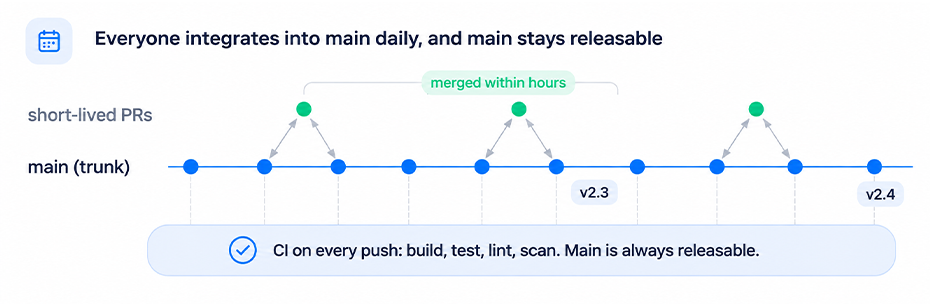
Short-lived PR branches rejoin main within hours, CI checks every push, and releases are just tags on main.
How It Works
- Each task starts by pulling the latest main, so you're always building on current code.
- You make a small, self-contained change, usually less than a day's work.
- You open a pull request on a short-lived branch (or commit directly if the team pair-programs) and get it reviewed the same day.
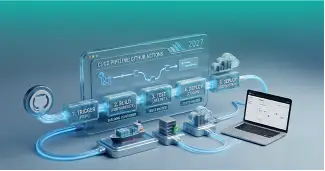
- Every merge triggers the CI pipeline: build, automated tests, linting and security scans.
- If main breaks, fixing it becomes the team's top priority, so it stays deployable.
- Work that isn't ready for users ships behind feature flags. It's merged and tested, but switched off.
- Releases come straight from main as tags or automatic deployments. There are no release branches.
The core idea: the sooner code is integrated, the cheaper problems are to find and fix. Integration happens early, in small pieces.
The daily loop is simple:
git pull --rebase origin main
git switch -c fix/cart-total
git commit -m "fix: round cart total to two decimals"
git push origin fix/cart-total
CI runs on every push. If the checks pass and a teammate approves, the branch merges and gets deleted.
Feature flags keep unfinished work hidden. You merge half-built code, but it stays switched off:
if (flags.isEnabled("new-checkout")) {
renderNewCheckout();
} else {
renderOldCheckout();
}
Once the feature is ready, you flip the flag. Remove it after full rollout, or old flags will pile up as tech debt.
Gitflow: Where It Helps and Where It Hurts
Gitflow is built around control. Every change waits on its own branch until someone reviews and approves it. That's great in some teams and painful in others.
When Gitflow Works Best
You ship numbered versions. Desktop software, SDKs, firmware and on-premise products need clear releases. Gitflow's release branch gives you a quiet space to test version 2.4 while version 2.5 keeps moving.
You support several versions at once. Some customers stay on old releases for years. Gitflow's hotfix branches let you patch 2.3 without touching unreleased work.
You work in a regulated industry. Banks, insurers and healthcare companies need to prove what shipped and when. Gitflow's tags and release branches create that paper trail. Pair them with solid cloud security and compliance controls.
Your team is mostly junior. Close reviews double as mentoring. A senior developer can explain why a change needs work, not just reject it. Over time, juniors learn the codebase faster.
Your product is mature and stable. At this stage, small mistakes can cost real money. Careful, reviewed changes matter more than speed.
When Gitflow Causes Problems
You're building an MVP. Early on, speed is everything. Waiting days for approvals slows learning. If you're racing to launch, MVP development needs a lighter workflow.
You need to pivot often. Customer feedback can change your plans every week. Long-lived branches built on old plans turn into painful merges.
Your team is senior and trusted. Experienced developers don't need every line approved by someone else. Heavy gatekeeping feels like micromanagement. It can also create office politics, where one reviewer holds others back.
You deploy every day. Gitflow can work with CI/CD, but its extra branches add steps. For web apps that ship daily, those steps rarely pay off.
Trunk-Based Development: Speed Built on Trust
In trunk-based development, everyone works on one shared branch, usually main. Developers merge small changes at least once a day.
Short-lived branches are allowed. They just shouldn't last more than a day or two. Once the code builds and the tests pass, it goes straight into main.
A common myth says trunk-based teams skip code review. Most don't. They review small pull requests within hours, not days. Small changes are faster to read and easier to fix.
Three things hold this model together:
- Fast automated tests that run on every push
- Feature flags that hide unfinished work from users
- A shared code style, enforced by linters, so reviews focus on logic
This setup also works well with a trusted outside team. A seasoned dedicated development team can ship straight to main, and you judge them by results.
When Trunk-Based Development Works Best
You're building a new product. You get maximum speed with minimum process. Ideas reach users in days, so you learn what works sooner.
You need to change direction fast. Customers may want something different from your first version. Small daily merges make it easy to pivot without untangling old branches.
Your team is experienced. Senior developers do their best work with autonomy. Give them clear goals and strong tests, then get out of the way.
You run a SaaS or web app. There's only one live version to maintain. Every merge can head to production, often the same day. A good DevOps and cloud support setup makes this smooth.
When Trunk-Based Development Causes Problems
Your test coverage is weak. If CI can't catch bugs, they land straight in main. A broken main blocks the whole team. A dedicated QA tester helps close that gap.
Your team is mostly junior. Without close guidance, code quality can slip quickly. Stricter reviews protect the codebase while people learn.
You accept outside contributions. Open-source projects can't give everyone write access to main. They rely on forks and reviewed pull requests instead.
You must support many versions. Pure trunk-based development assumes one live version. You'll need short release branches on top, which adds some process back.
GitHub Flow vs Gitflow vs GitLab Flow
Most teams don't run pure Gitflow or pure trunk-based development. They land somewhere in between.
The feature branch workflow is the base for all of these. Every change gets its own branch. It merges back through a pull request. The models differ in how long branches live and where they merge.
GitHub Flow has one rule: main is always deployable. You branch, commit, open a pull request, get a review, merge, and deploy. There's no develop, release, or hotfix branch.
So in the GitHub Flow vs Gitflow debate, the gap is simple. GitHub Flow drops the ceremony. Gitflow keeps it for controlled releases.
GitLab Flow adds environment branches, such as staging and production. Code moves forward through them in order. It suits teams that need a staging step but don't want full Gitflow.
Here's a quick way to see Gitflow vs GitHub Flow vs GitLab Flow:
- Gitflow: many long-lived branches and scheduled releases.
- GitHub Flow: one main branch and deploy after every merge.
- GitLab Flow: one main branch, plus environment branches for promotion.
All three depend on a solid pipeline. If yours is shaky, DevOps and cloud support can fix it before you switch models.
How to Choose a Git Branching Strategy
Start with how your product goes from testing to launch. List the versions you support, how often you deploy, and how long it takes a PR to pass review and testing.
The best Git branching strategy for small teams shipping one version is usually a protected main with fast PR reviews. If you need a release branch strategy, define when to cut a branch, who can backport fixes, and when support ends.
Final Thoughts
Gitflow gives you control. Trunk-based development gives you speed. GitHub Flow gives most teams a simple middle path. Start where your tests and team are today. Shorten branches as you grow, and let your delivery numbers guide the next step.
Need help setting up branching, CI checks or feature flags? Talk to our team.
FAQs
What is the best Git branching strategy?
There isn't one best option for everyone. GitHub Flow suits most small web teams. Trunk-based development suits teams with strong tests. Gitflow suits versioned or regulated software. Match the choice to how your product ships, as with any product development decision.
Is GitFlow still used in 2027?
Yes, but mostly for software with version numbers. Desktop apps, SDKs and firmware still rely on it. So do regulated products, like banking apps where KYC and compliance rules demand clear release records. Most SaaS teams have moved to simpler models.
What is the difference between GitFlow and GitHub Flow?
Gitflow uses long-lived main and develop branches, plus release and hotfix branches. GitHub Flow uses only main and short feature branches. It suits a cloud app that deploys after every merge.
Does trunk-based development work without feature flags?
Yes, if every change is small enough to finish in a day. Larger features need flags, or half-built code reaches users. Flags also let UI and UX teams test new screens with a few users first.
How long should a feature branch live?
Ideally less than two days. After that, conflicts grow quickly. Break big features into small slices during planning. A clear PRD written from a vague brief makes that much easier.