What Is MCP (Model Context Protocol) and Why Every AI Team Is Adopting It

Model Context Protocol (MCP) is an open standard that lets AI applications connect to external tools and data. For teams, it provides a common way to connect assistants with the systems they already use.
Imagine asking your assistant why a customer cannot download a purchased file. Without access to the order system, it can only offer general advice. With an approved connection, it can check the actual order before answering. You can relate it to USB-C for AI; it replaces the need for custom integration by providing the same interface.
Before connecting your business systems, you need to understand what MCP handles, what your application handles, and which actions should require approval.
What Is Model Context Protocol (MCP) And Why Was It Created
MCP is an open standard, originally released by Anthropic in November 2024, that defines a common language for AI models. It connects with external tools, databases, and data sources. Think of it less like a flashy new AI feature and more like an electrical socket standard. It doesn't make the appliance better; it just means every appliance fits every wall.
Since its release, MCP has moved out from under Anthropic's sole ownership. In late 2025, governance shifted to the Linux Foundation's Agentic AI Foundation, with OpenAI, Google, Microsoft, AWS, and Block all backing it as supporting members. That matters for one practical reason: it's no longer "Anthropic's protocol that other companies tolerate." It's shared infrastructure, which is usually a sign a standard is going to stick around rather than get replaced in eighteen months.
Before MCP: The AI Integration Problem
Different AI applications often need access to the same tools. A coding assistant might need GitHub, while a support assistant needs customer records and product documentation. MCP standardizes the interface between those applications and external capabilities.
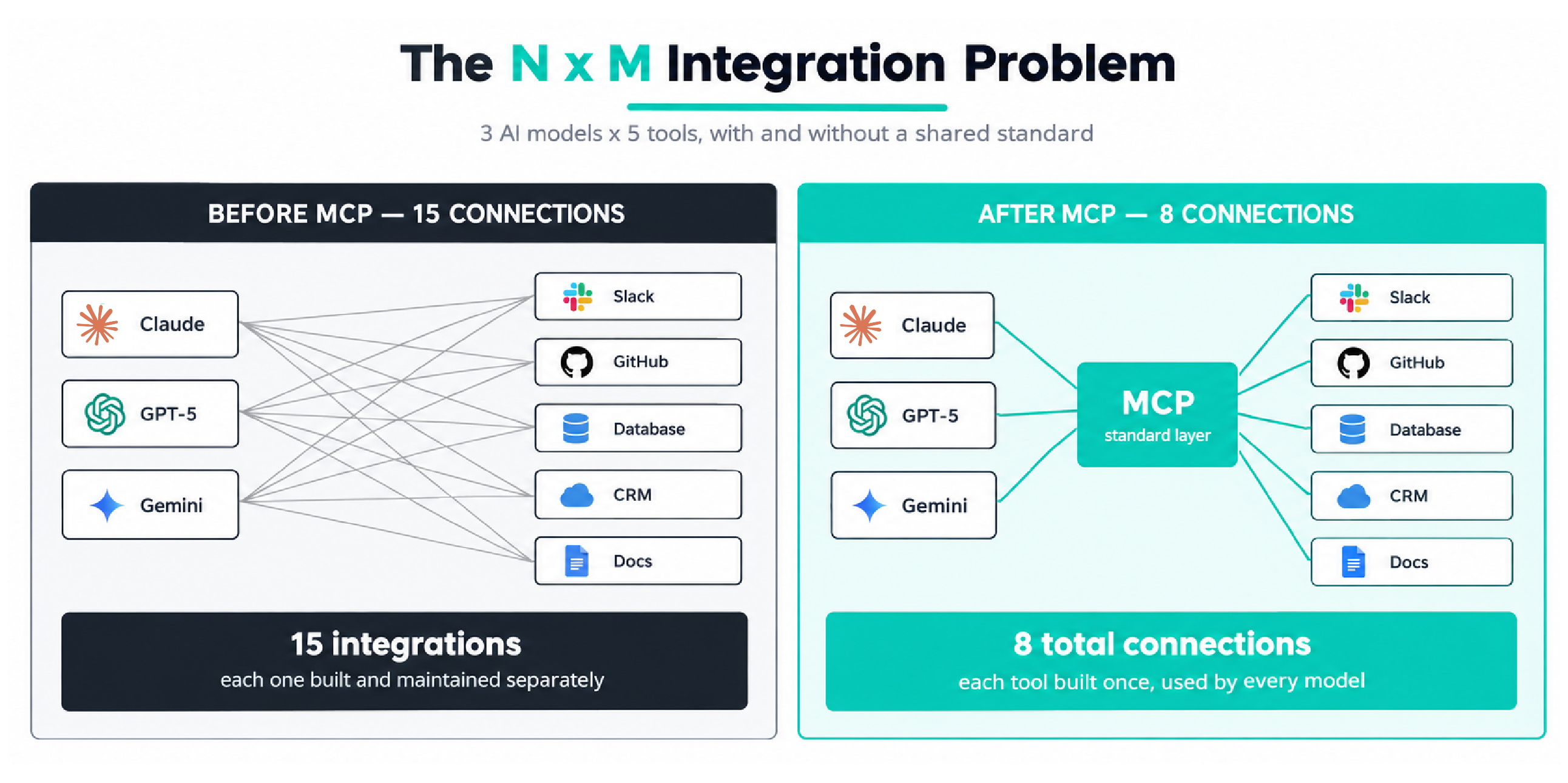
Consider three AI applications and five business tools. Without a shared interface, there could be up to 15 application-tool combinations to support. This is the N × M integration problem: connections multiply as either side grows. Also, shifting from Claude to GPT-5 means reworking the entire integration system, which consumes more time.
MCP lets developers expose a system through a reusable server instead of rebuilding the interface for each compatible assistant. However, authentication, business rules, and client-specific features still need work.
When choosing AI for team workflows, ask which repeated connection problem needs solving. Adding MCP without a clear use case simply gives you another component to maintain.
MCP Architecture: Host, Client, And Server
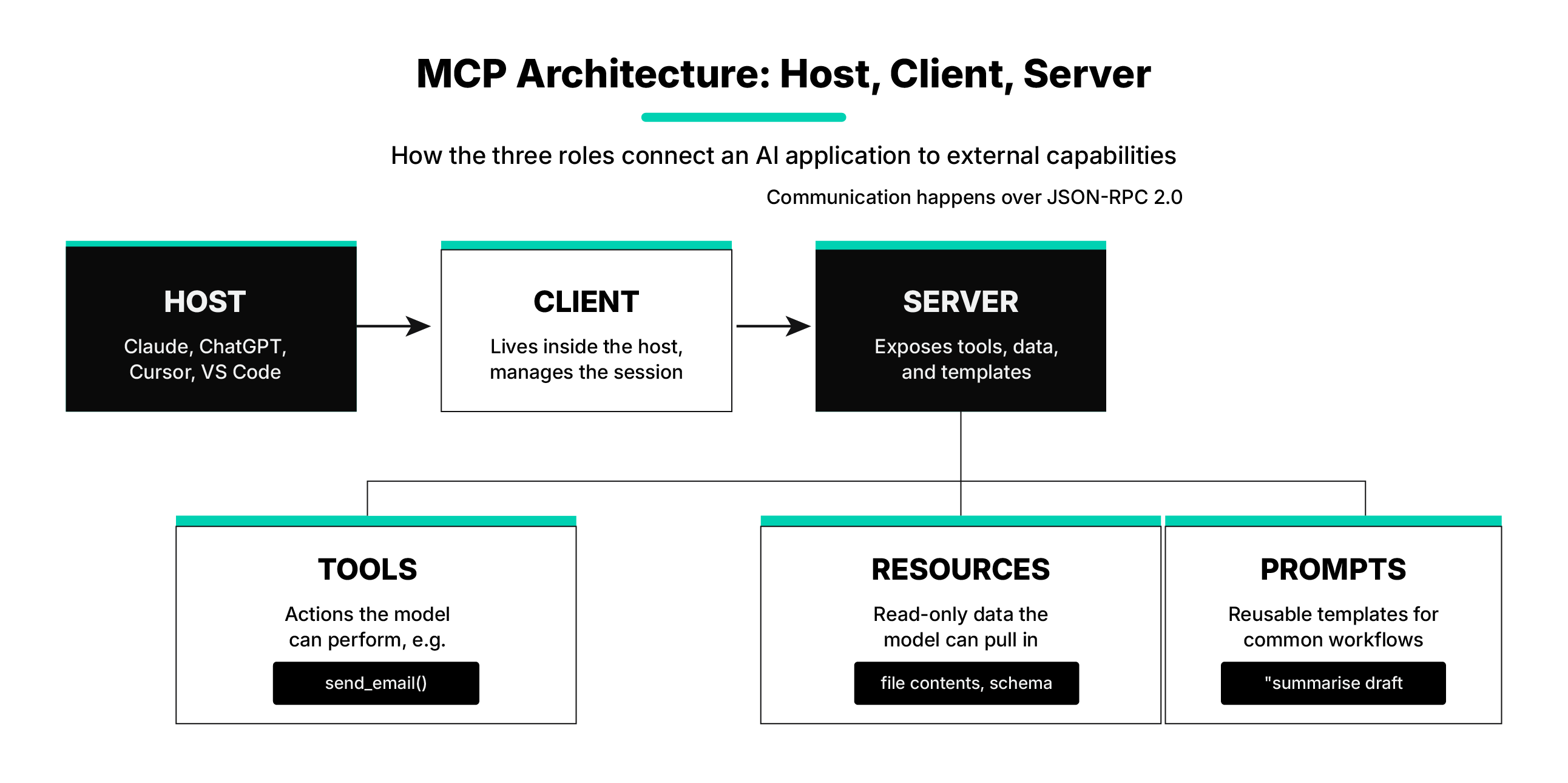
Architecture has three roles. The host is the AI application you use; a client inside that host handles MCP communication; and an MCP server exposes capabilities from a connected system. One host can manage multiple clients and servers.
A server can provide three different things:
A simple example: imagine asking an assistant to "find the latest sales report and email it to my manager." The model can't do either of those things on its own. Through MCP, it discovers a database query tool and an email sender tool. It calls the first to retrieve the report, then calls the second to send it all without you writing a single custom integration for either action.
These are protocol features, not three separate AI models. A server can implement the capabilities it needs without providing every feature.
How Does MCP Work
MCP simplifies the process by shifting the issue from N × M to N + M. Instead of building new, separate integrations for every AI client, developers build one service for each resource. Such as GitHub or PostgreSQL.
In the 2026 MCP specification, the protocol core is stateless, so each request carries the information needed to process it rather than depending on a long-lived protocol session. Applications can still preserve workflow state across multiple steps when needed.
Suppose you sell downloadable design templates. A support agent asks, “Can this customer access the pack they purchased?”
Here is an illustrative workflow using a custom tool called check_download_access:
- The host receives the question and has access to the connected server’s tool listing.
- The model selects the relevant tool and supplies the order identifier.
- The application checks its tool-use policy, and the server validates the caller’s access to that order.
- The server checks the store’s records and returns the purchase and access status.
- The assistant explains the result, including anything the system could not confirm.
MCP provides standard methods for listing and calling tools. The store still supplies the actual business logic and must enforce access controls.
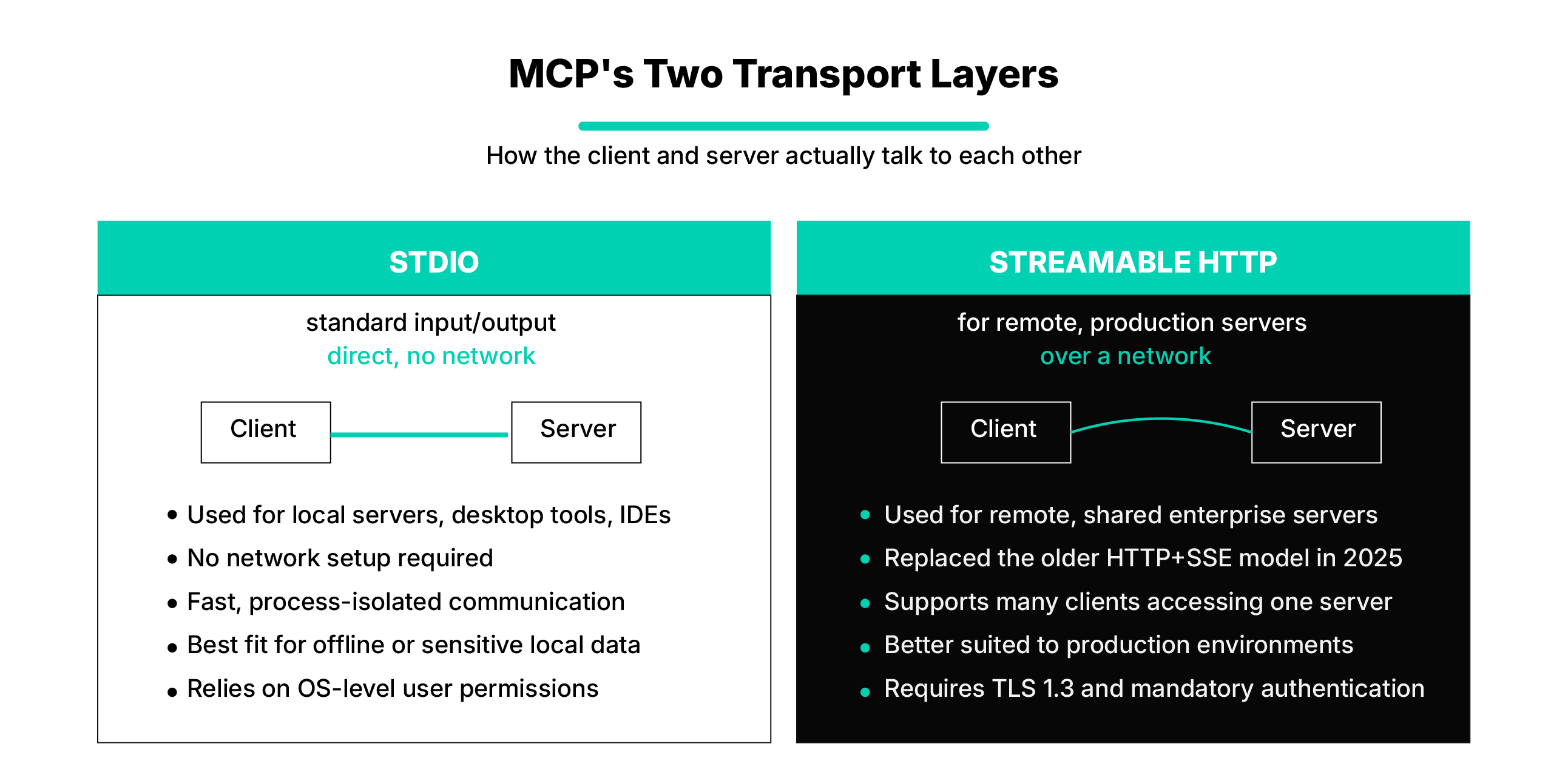
MCP use only two layers of communication:
· Studio: Commonly used for local MCP servers, desktop tools, and IDE workflows. It allows the client and server to communicate directly without setting up a network connection.
· Streamable HTTP: Used for remote MCP servers that communicate over a network. It replaced the older standalone HTTP+SSE transport model and is better suited to shared or production environments.
· Notice the boundary: checking access should not automatically grant access. Creating a new license or sending a download email would be a separate action with its own permission rules.
MCP Vs API, Function Calling, RAG, And A2A
These technologies solve different parts of an AI workflow. You can use several together rather than choosing one replacement for everything.
Function calling does not necessarily execute anything itself: the application may run the requested function and return its result. MCP standardizes the external interface; it does not replace that model-and-application interaction.
Similarly, an MCP connection does not automatically create a RAG system. You still need a retrieval process that finds relevant information.
What Changed In MCP In 2026
As of September 9, the current published specification is 2026-07-28. This matters because older tutorials describe connection behavior that no longer defines the newest protocol version.
Requests No Longer Depend On Protocol Sessions
The July release introduced a stateless core. Requests carry the information needed to process them, replacing the old initialization handshake and protocol-level session identifiers. This supports distributing requests across server instances without relying on connection-specific context.
Stateless does not mean your assistant forgets the conversation. Applications can still store history, shopping carts, or ongoing work; a state that spans tool calls uses explicit identifiers rather than an assumed connection session.
Tools Can Request Missing Input
Multi Round-Trip Requests, or MRTR, let a server return an input-required result. The client collects the requested information and resubmits the request with the answers attached. A tool could use this flow to request confirmation before continuing.
Extensions Support Longer Jobs And Interactive Interfaces
The Tasks extension lets a server return a durable task identifier for longer operations. A compatible client can check progress and retrieve the result after reconnecting, rather than keeping one request open throughout the job.
MCP Apps serve a different purpose: they let supported hosts display interactive interfaces, such as forms and charts, inside a conversation. Neither Apps nor Tasks should be assumed available simply because a product supports basic MCP.
Compatibility Still Needs Checking
The release also added cache guidance for listings and header-based routing. The older HTTP+SSE transport is deprecated, but Streamable HTTP can still use SSE for streaming responses.
Check the versions supported by your client, server, and software development kit before upgrading. A current specification is not proof that every existing integration has adopted it.
Pros of Using the MCP
The Model Context Protocol provides several benefits for building and deploying AI-powered applications. It helps AI systems access current information, connect with external tools, and handle more useful tasks.
1. Reduced Hallucinations
LLMs generate answers based on their training data and the context available to them. MCP gives AI applications a structured way to access external data sources when needed. This can help models use more relevant and current information instead of relying only on what they learned during training. However, MCP does not completely prevent incorrect answers because accuracy still depends on the quality of the data and the model’s reasoning.
2. Increased AI Utility and Automation
LLMs are limited when they cannot access current systems or perform actions outside the model. MCP allows AI applications to connect with tools such as databases, business software, development platforms, and internal systems. This means AI can do more than generate text. Depending on the permissions provided, it can retrieve information, check records, update systems, or complete approved tasks.
3. Easier Connections for AI
Before MCP, connecting multiple AI applications with different tools often required separate integrations for each combination. This created what is commonly called the N × M integration problem, where the number of connections increases quickly as more models and tools are added.
MCP provides a common standard for these connections. Developers can build reusable MCP servers that compatible AI applications can access. This can reduce repeated integration work, lower development effort, and make it easier to add new tools or AI clients as a system grows.
4. MCP And Security
One of the main advantages of MCP is reusability. Developers can connect a system once and allow different compatible AI applications to work with the same data without repeatedly exporting or copying information into separate chats.
For example, a customer support agent may use connected order data to check a recent purchase, while an analyst may use the same source to identify purchasing trends. Both can work with the same underlying information while using different tools and permissions based on their roles.
Standardization also reduces dependence on one client’s integration format. However, MCP does not remove every switching cost. Authentication methods, supported features, permissions, and application behavior can still differ, so teams need to review compatibility before moving between clients or servers.
Tool Schemas for Digital Goods
If you're building or selling anything digital through an AI assistant, a subscription product, a downloadable asset, or an API credit package, the tool schema is where accuracy actually lives or dies.
A tool schema defines exactly what inputs a model can send and what output it should expect back. For digital goods, that typically means:
- Product identifiers (SKU, plan ID): not free-text names, which the model can misinterpret
- Explicit types and constraints (quantity as an integer, price as a fixed currency format)
- Clear required vs optional fields, so the model doesn't guess at missing data
- Structured, predictable responses: a purchase confirmation tool should return a consistent object every time, not a free-form sentence.
A minimal example for a digital product lookup tool might look like this:
The tighter the schema, the fewer hallucinated prices, wrong SKUs, or malformed orders you'll see downstream. This is one of the most overlooked parts of MCP adoption for commerce-oriented teams.
Security: The Part Worth Slowing Down For
MCP's adoption has outpaced its security maturity, and that gap is worth taking seriously rather than glossing over.
- Tool poisoning is a documented risk. Attackers can hide instructions inside a tool's metadata. It is invisible to the user but read by the model, and in controlled tests, this worked at alarmingly high rates when auto-approval was enabled.
- Not every public server is safe. A meaningful share of publicly available MCP servers have been found to contain command injection vulnerabilities. Popular packages have also had serious, widely-installed CVEs patched only after the fact.
- Treat MCP servers like browser extensions, not like trusted internal code: install only what you need, from maintainers you can verify, and review permissions before granting access.
- Require human approval for high-risk actions: anything that writes data, spends money, or touches sensitive systems should not run on auto-approve.
Selecting An Efficient MCP Server
The flexibility of the Model Context Protocol lets developers deploy MCP servers in different ways based on the application's needs. The right setup depends on several factors, including performance, security, scalability, data access, and the level of infrastructure management required.
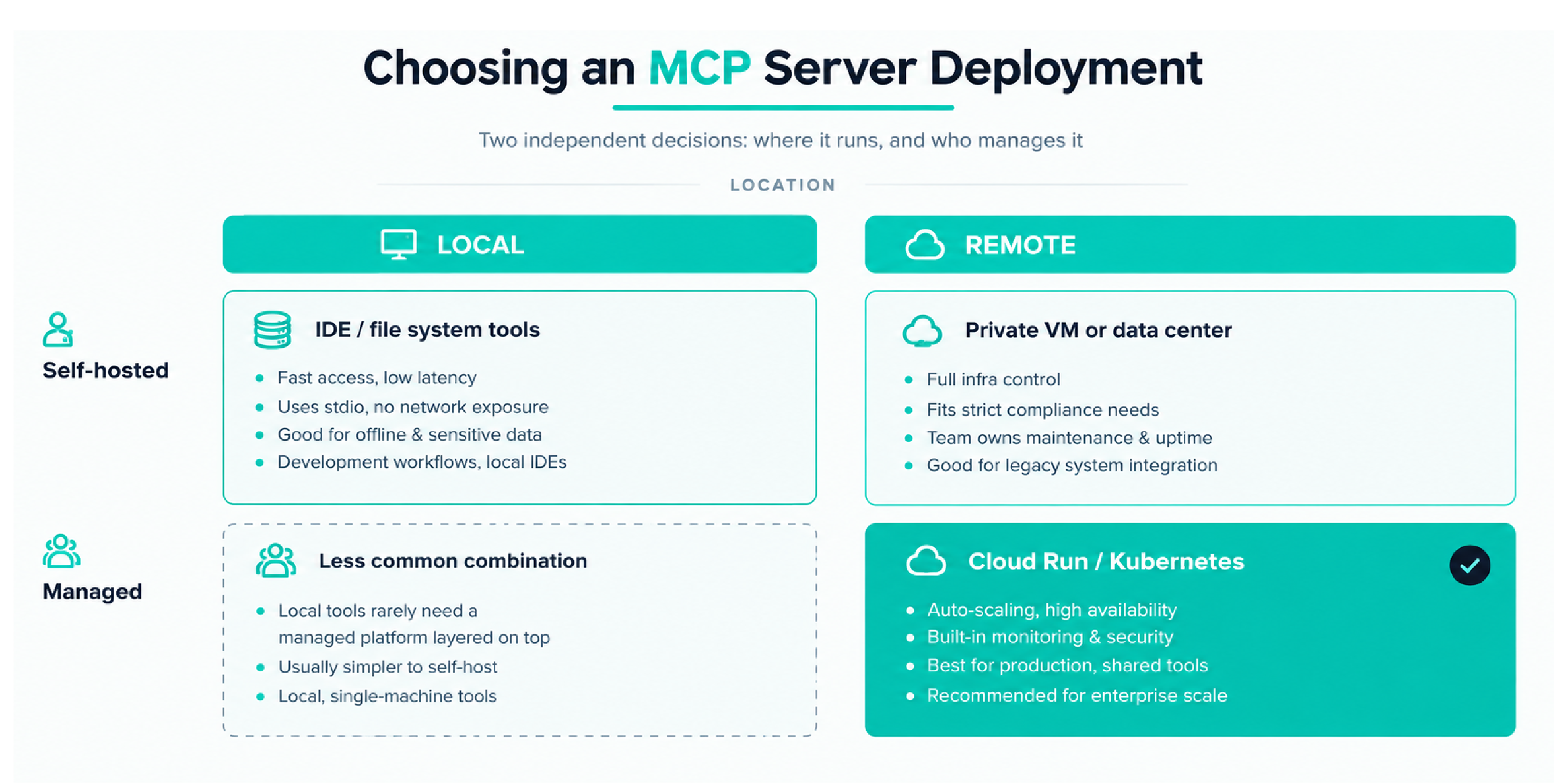
Remote vs. Local Servers
MCP servers can run locally alongside an AI application or remotely on another machine, private network, or cloud environment.
- Local servers: Local MCP servers are generally beneficial when tasks need fast access and low latency. For example, they can connect an AI assistant to a local integrated development environment (IDE), file system, or internal application. They commonly use standard input/output (stdio) for communication. Because the data can remain on the same device or internal environment, local servers may also reduce unnecessary network exposure. This setup can work well for offline tools, development workflows, and applications that handle sensitive local data.
- Remote servers: Remote MCP servers are useful when tools or data need to be shared across multiple users or applications. They can connect AI systems to web APIs, databases, internal business systems, or cloud-based services. Remote servers can support network-based communication and make it easier to centralize tools that several AI applications need to access. This approach is often a better fit for shared enterprise systems and applications that need to scale across teams or locations.
Managed vs. Self-Hosted Servers
Developers also need to decide who will manage the infrastructure that runs the MCP server.
- Managed servers: Managed platforms reduce the amount of infrastructure work developers need to handle directly. Services such as Cloud Run or Kubernetes-based platforms can provide features such as scaling, availability controls, monitoring, and security configuration. This allows development teams to spend more time building MCP tools and less time maintaining the underlying servers. Managed hosting is often useful for production applications that need consistent performance and easier scaling.
- Self-hosted servers: Self-hosting gives organizations greater control over where and how an MCP server runs. A server can be deployed on internal hardware, a private data center, or a custom cloud virtual machine. This option may be useful when an organization has strict security policies, compliance requirements, legacy systems, or infrastructure rules that are difficult to support through a managed platform. However, the organization is also responsible for maintenance, updates, monitoring, security, and availability.
There is no single deployment model that works best for every MCP implementation. Developers should choose the setup that matches the application's data sensitivity, expected traffic, performance needs, access requirements, and operational resources.
Wrap Up
Start with one workflow you can verify. Choose a narrow task, connect only the data needed for that task, and define what a correct result should look like before expanding access. Test common failure cases as well, including missing records, denied permissions, unavailable tools, and failed requests.
For teams, success should not be measured by how many servers or systems are connected. The real value comes from building a repeatable workflow that works within clear permissions and gives reliable results. Teams should also know who is responsible when something fails and how the issue will be handled.
At Amrood Labs, the goal should be to use MCP in a practical and controlled way. Starting small, testing carefully, and expanding only after the workflow proves reliable can help teams gain more value from AI while keeping access, accountability, and system behavior easier to manage.
Frequently Asked Questions (FAQ’s)
What is Model Context Protocol (MCP) in AI?
MCP is a communication standard for connecting AI applications to external capabilities. An MCP AI setup still needs a model, an application, and connected services; the protocol itself is not a model, database, or autonomous agent.
How does MCP affect system performance and hardware requirements?
MCP doesn't require special hardware to run locally, since it typically runs as a lightweight subprocess. The real cost is in context window tokens. Each connected server adds its tool definitions to every conversation, which can slow responses and reduce tool-selection accuracy if too many servers are connected at once.
What is a tool schema, and how does it apply to digital goods?
A tool schema defines the exact inputs and outputs a model can use when calling a tool. For digital goods, a tight schema with fixed identifiers, strict types, and clear required fields reduces errors like wrong SKUs or malformed orders.
Where can I find MCP servers on GitHub?
GitHub hosts thousands of community and vendor-built MCP servers, covering everything from databases to Slack to file systems. Before installing one, check its documentation, maintenance activity, and permission requirements
Does MCP make AI answers more accurate?
MCP can improve access to relevant information, but it does not guarantee a correct answer. Retrieval may provide better evidence, while the model can still choose the wrong tool or misunderstand what comes back. In our store example, “payment received” and “download access granted” are different facts. Test that the assistant keeps them separate and admits when a required status is missing.
Table of Content
Share Now
.png)