



AI features have become a familiar part of the products we use every day. They help us find information across different sources, draft emails, create content, and break complicated tasks into manageable steps. But adding AI to a product is only the beginning. The harder part is giving people a reason to rely on it and feel comfortable coming back to it.
That is why designing for AI has become a core skill for product designers. There is still a clear gap between using AI and trusting it. A 2025 study by the University of Melbourne and KPMG, involving more than 48,000 people, found that 66% use AI regularly, while only 46% are willing to trust it. Errors can damage that trust, and an interface that hides uncertainty or makes mistakes difficult to spot can make the problem worse.
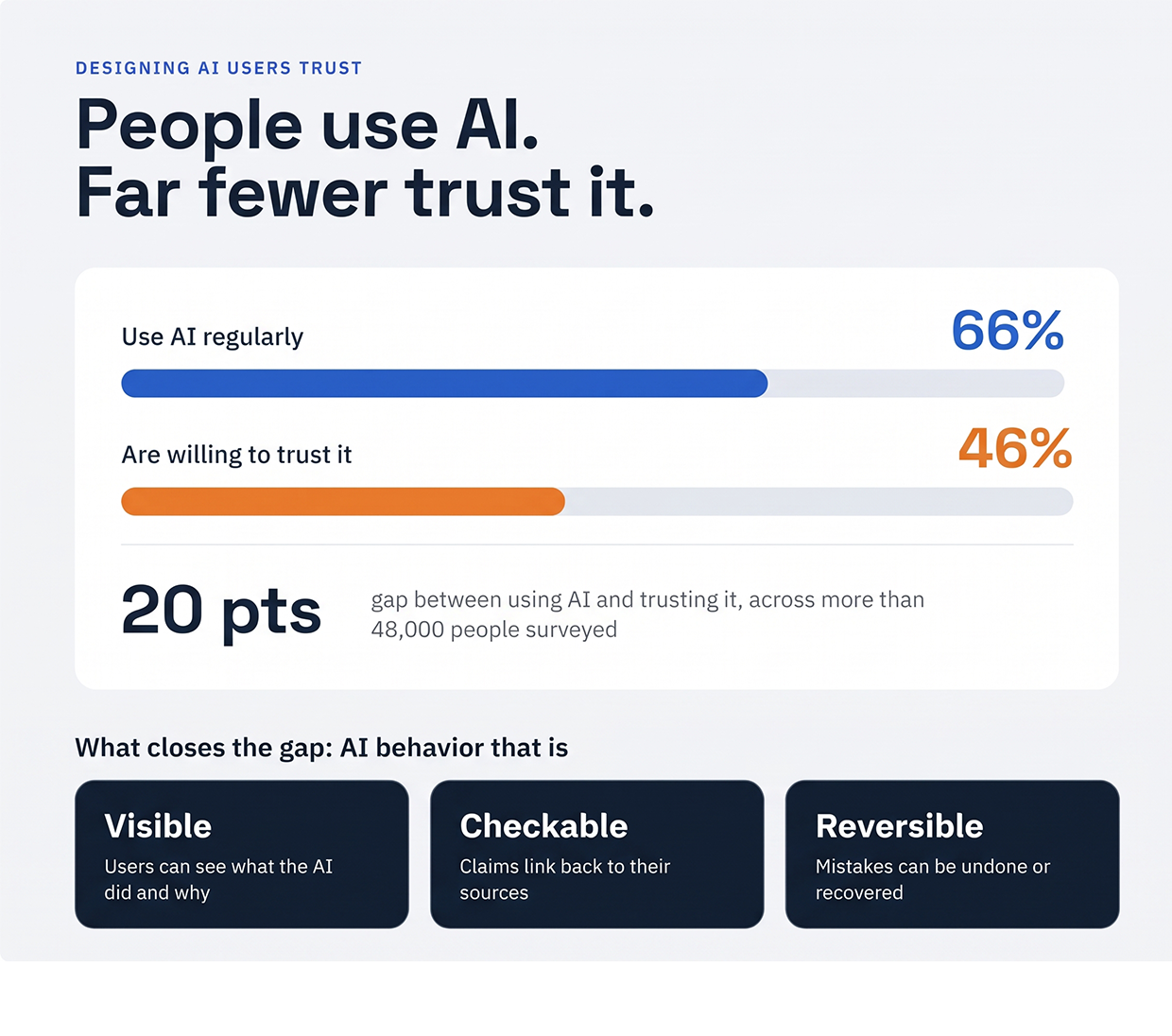
Good AI UX design patterns fix this by making AI behavior visible, checkable, and reversible, a principle that applies to every AI solution, from chatbots to background automation. They need to apply to everything from a simple chatbot to an automated workflow running in the background. In this article, we will explore five UX patterns that help users feel more confident using AI features, with practical product examples along the way.
Five AI UX Design Patterns for Building Trust
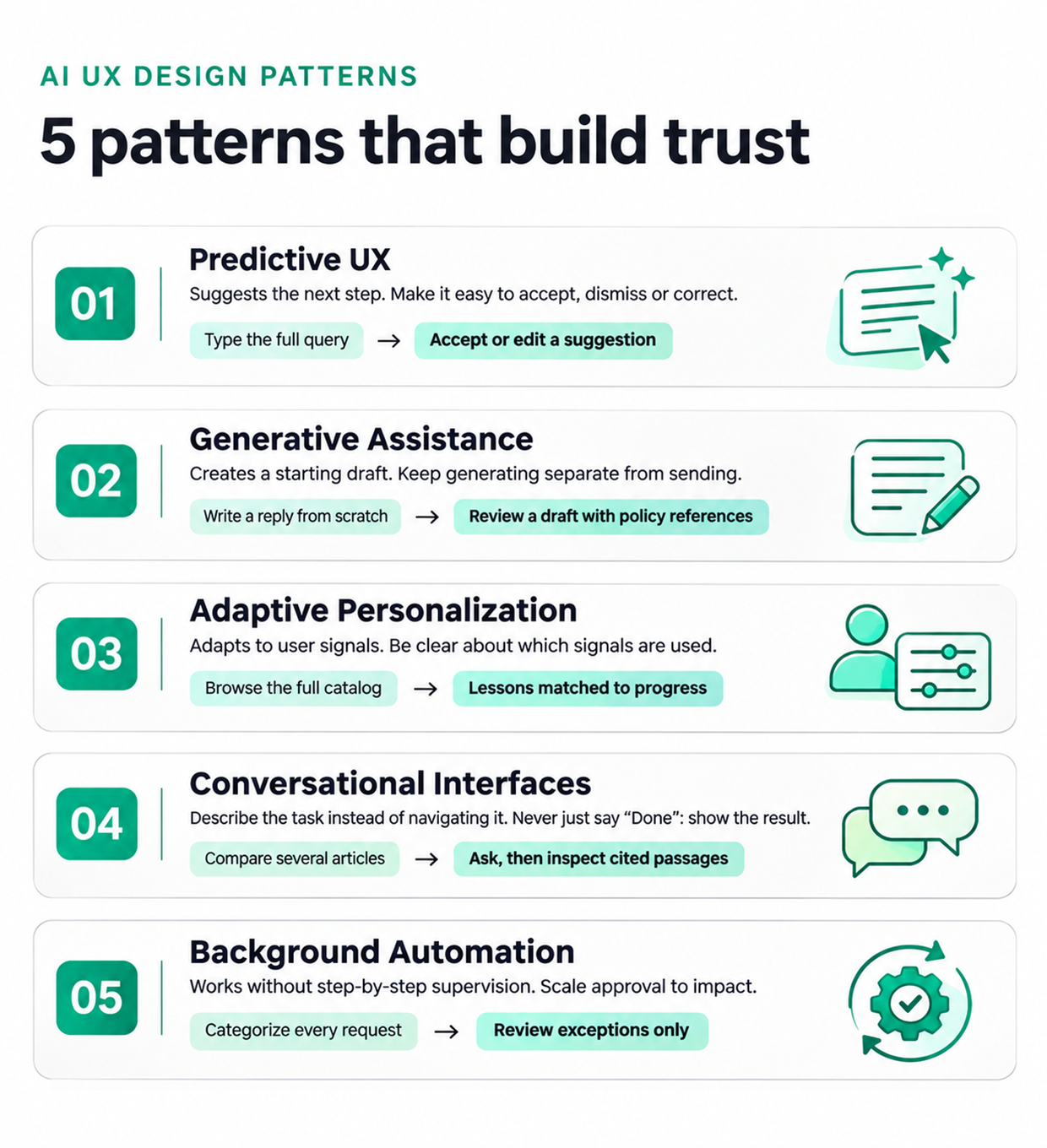
Different tasks need different levels of AI involvement. A writing suggestion can remain optional, while an automated account update may require approval. The following patterns provide a starting point for designing AI features around the user’s goal, the information available, and the consequences of getting something wrong.
1. Predictive UX
Predictive UX uses available signals to suggest what a user might want to do next. Instead of asking someone to search through menus or type a complete message, the interface offers a relevant shortcut. In AI-enabled products, these suggestions may use recent activity, current inputs, or permitted historical data. Their role is to reduce effort while leaving room for the user to choose differently.
How does predictive UX improve the experience?
The benefit comes from shortening repeated interactions. Gmail’s Smart Compose, for example, offers writing suggestions that users can accept with Tab; users can also disable them. The same principle applies to predictive workflow design: suggestions should be easy to accept, dismiss, or correct. Avoid silently completing a consequential action because a predicted intention is still an assumption.
2. Generative Assistance
Generative assistance creates something new from a user's instructions and the context available to the system. That might be an email draft, a document summary, or an initial layout. The user describes what they need, and AI produces a starting point they can review and improve. Trust grows when people can see which information the output draws on and make changes without fighting the interface. In generative AI solutions, reviewing and revising should feel like a normal part of the task.
AI Creation or Co-Creation: Which Works Better
Co-creation is useful when the user needs to adjust facts, tone, structure, or individual sections. A support agent might shorten a reply while preserving its verified policy references. Good interaction designs keep the original, highlight changes, and separate generating from sending. A polished answer should never imply that its facts have already been checked.
Make revision specific: edit one sentence, reject an unsupported claim, or regenerate only a selected paragraph. Undo should restore the previous version of the AI change, rather than remove the last typed character. In product development, also consider whether another person has edited the same record since generation. A rollback should explain conflicts instead of overwriting newer work without warning.
3. Adaptive Personalization
Adaptive personalization changes recommendations or content using relevant user signals. A learning platform might recommend material based on completed lessons; a dashboard might prioritize frequently used reports. Compared with fixed preferences, this approach can respond to changing behavior. However, personalized product development needs clear boundaries around which signals are used and what users can influence.
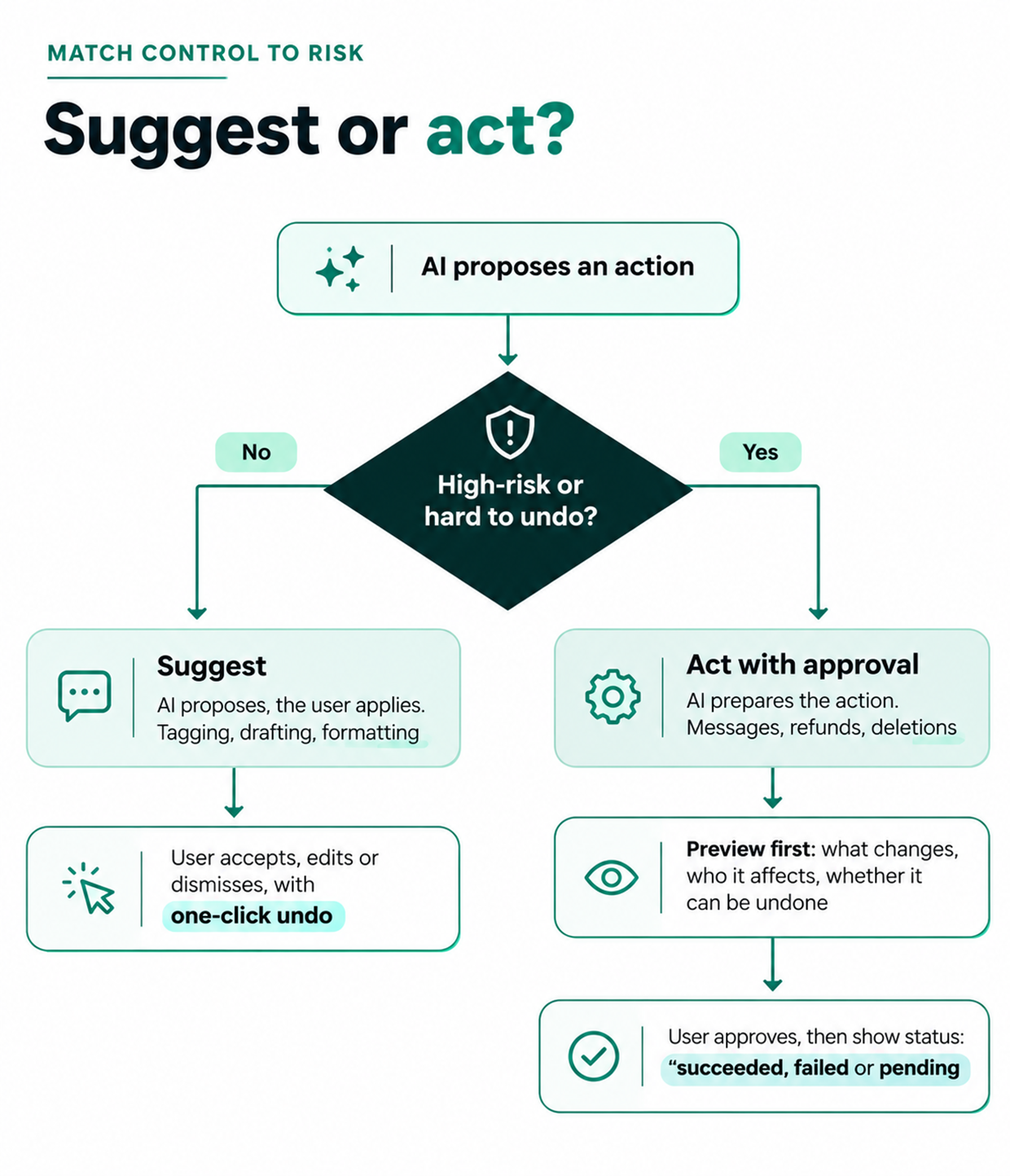
Suggest Vs. Act: What's The Right Approach
Match the level of control to the level of risk, as you would in any AI automation workflow:
- Suggest: The AI proposes, the user applies. Best for low- and medium-risk tasks like tagging, drafting, or formatting, with one-click undo
- Act with approval: The AI prepares the action and shows a preview of what will change, who it affects, and whether it can be undone. Best for high-risk tasks like sending messages, refunds, or deleting records
4. Conversational Interfaces
Conversational interfaces allow users to describe a task rather than navigate every step themselves. They can support information retrieval, troubleshooting, and workflows with several possible paths. An effective AI assistant asks focused questions when a request is ambiguous. For example, “Update the customer” might mean creating a draft, changing a CRM record, or sending a message; these actions need different permissions.
How Should Conversations Connect to Product?
Keep answers connected to visible product controls. Users should be able to open a cited policy, edit a record through a form, or switch to human support. In CRM-connected workflows, show the affected customer and proposed changes before execution. A chat response saying “Done” is insufficient when the user cannot see whether the action succeeded, failed, or is still pending.
5. Background Automation
Background automation handles tasks without requiring users to supervise each processing step. It can extract document information, classify incoming requests, or prepare recurring summaries. A well-designed AI workflow makes the permitted scope clear and reports meaningful outcomes. The amount of approval required should depend on the action’s impact and reversibility.
AI UX Best Practices That Support Trust
The five patterns describe what AI does; the following practices shape how people experience it. Microsoft’s human-AI interaction research proposed 18 guidelines and included evaluation by 49 design practitioners across 20 AI-infused products.
I. Explain Capabilities During Onboarding
If you are considering how to design AI onboarding, start with a specific promise: “Drafts replies using this ticket and your help center; billing records are unavailable.” Show a sample input and output, then introduce advanced options when relevant. Google PAIR’s mental-model guidance emphasizes communicating capabilities and limitations. Effective design helps users begin with a realistic understanding instead of discovering boundaries through mistakes.
II. Make Sources, Confidence, and Disclosure Useful
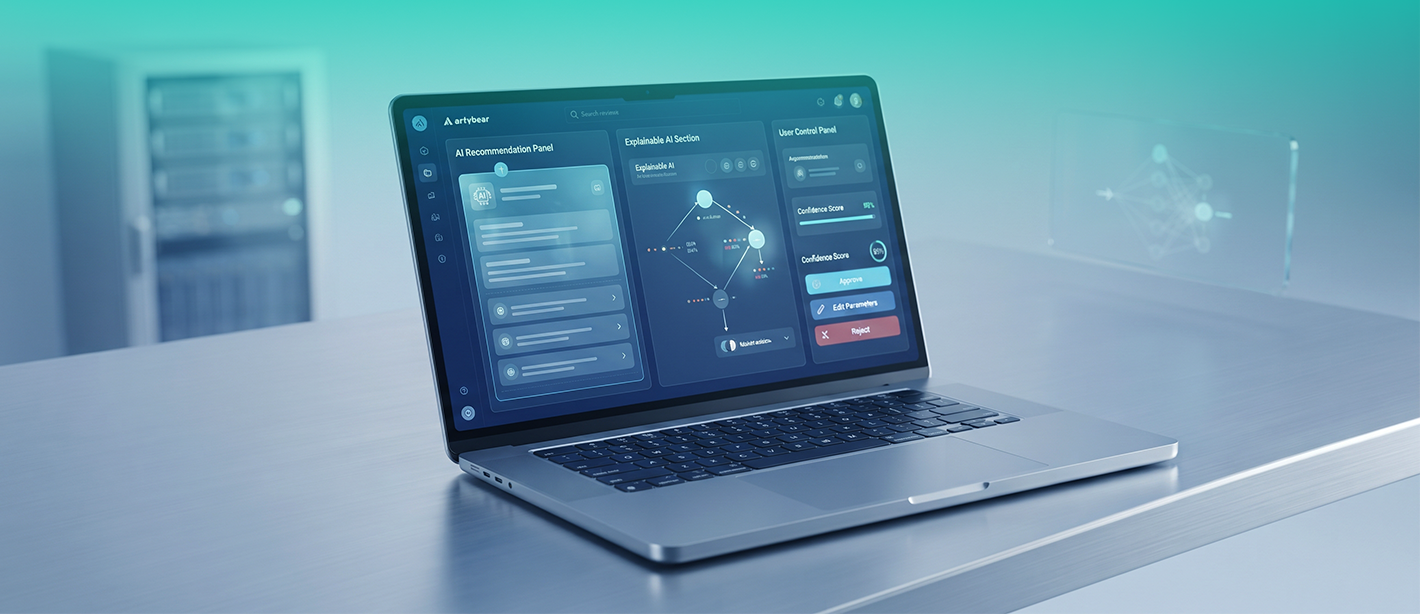
Explainable AI UX connects important claims to supporting passages and identifies outdated or conflicting information. When deciding how to show AI confidence to users, test plain-language states such as “Missing context” before adding numerical scores. Google PAIR cautions that confidence percentages can be difficult to interpret.
III. Separate Data Access from Action Permission
Permission to read a document is different from permission to modify it or send its contents elsewhere. Explain what the feature accesses, stores, and uses for training, then allow permissions to be revoked. For connected systems, preview recipients and changes before consequential actions. Provide activity history and accurate recovery controls: deleting a stored preference is not necessarily the same as deleting conversation logs.
IV. Design Accessible Status and Recovery States
AI error handling UX should distinguish missing context, unsupported answers, and technical failures. Explain what happened, preserve existing work, and offer a manual path or human handoff. W3C’s status-message guidance explains how updates can reach assistive technology without moving focus; announcing every streamed word repeatedly can interrupt the task.
For example, a support assistant could say: “The refund policy is unavailable. Your draft is saved. Open the policy library or write the reply manually.” These options address the blocked task. If the user chooses human support, offer to pass relevant context with consent.
How to Test Whether the Patterns Work
Include correct, wrong, incomplete, and outdated outputs in usability testing. Ask participants to inspect a source, identify an unsupported claim, correct a result, and cancel or reverse an action. Include different experience levels, languages, and accessibility needs. Compare completion time and accuracy with the manual workflow, including the effort needed to verify AI output.
Track incorrect-answer acceptance, correction success, recovery completion, and abandonment. Satisfaction alone can hide overreliance: users may like an interface while accepting its mistakes. Repeat consequential scenarios after model or data-source changes, and assign responsibility for recurring failures. A practical AI product evaluation checks whether users accept supported results and challenge unsupported ones, including differences between user groups.
Final Thoughts
More automation can remove steps while adding verification or correction work. Keep predictable rules and manual controls where they better serve users. The strongest AI UX design patterns make assistance useful, evidence accessible, and mistakes recoverable. Amrood Labs’ UI/UX design services include research, prototyping, testing, and audits to help turn these principles into product decisions.
FAQs;
Should a Product Be AI-Driven or AI-Assisted?
Choose according to task reliability and the consequences of an error. Editable drafts and recommendations often suit an assisted approach; bounded automation can suit repeatable tasks with monitored exceptions. In AI solution planning, automate only the scope you can evaluate and support, with stronger checkpoints for consequential actions.
Do these patterns replace the traditional UX process?
Keep research, prototyping, testing, and iteration. Add variable outputs, data permissions, verification, and recovery scenarios. For product development, the question remains whether people can complete their work successfully. AI changes the conditions you test, but it doesn't remove the need for user research.
How do you test AI UX when outputs change every time?
Prototype with best, average, and worst-case outputs, including wrong ones, and test the recovery flow as carefully as the happy path. Our team can turn these cases into an automated evaluation suite.