Python continues to dominate as developers use AI in 2026, across every stage of the stack from training to deployment. It offers developers an easy way to write code and is a high-level language with a wide collection of libraries for various use cases. Roughly, it has 200,000 plus libraries.
Python libraries are collections of pre-written modules, classes, and functions you reuse instead of writing everything from scratch. You can use libraries to:
- Build web applications
- Analyze and transform data
- Train machine learning models
- Process images and video
- Run scientific and numerical workloads
When people talk about python top libraries in 2026, they usually mean tools for data and AI. Python’s strength here comes from its rich set of libraries for data manipulation, visualization, ML, and deep learning. Many of the top python libraries for AI context data now sit alongside long-standing data libraries in real systems.
This article focuses on five practical areas:
- Staples of data science
- Machine learning
- AutoML
- Deep learning
- Natural language processing
How to Use Python Libraries in 2026
Python libraries let a Python developer reuse tested code rather than rebuild common features. In 2026, this matters more than ever because the ecosystem is huge. With so many options, the basics of using libraries well make the difference between builds and dependencies.
1. Import Libraries:
Start importing libraries by using the import statement. You have an option to either import the entire library or only the modules you require. For a Python developer working with popular libraries in Python in 2026, this is the first step in using proven, shared code instead of writing everything from scratch. PyPI now lists about 737,000 projects, so importing only what you need also helps you stay organized when options are large.
2. Utilize Functions and Classes:
After import, use the library’s functions, classes, and objects inside your program. Call functions for common tasks and create class instances when the library uses object-based APIs. This approach lets you build features faster while leaning on code that many teams already test in real projects.
3. Read Documentation:
Carefully read the documentation before you use it. The document explains all the minor details such as functions, return values, edge cases, required parameters, and usage patterns. This reduces bugs and helps you pick the right API from the start.
4. Manage Dependencies:
To install the necessary libraries, use pip. To maintain builds consistent across machines and deployments, pin versions. To avoid version conflicts and make upgrades safer, use virtual environments to separate requirements for each project.
5. Optimize Performance:
Prefer library features built for speed. Using the appropriate call can minimize runtime and memory usage because many libraries come with optimized implementations for common operations. To optimize the actual bottlenecks rather than conjectures, profile the slow sections of your code.
6. Customize Functionality:
Adjust library behavior when you need a better fit. Many libraries support configuration options, subclassing, and method overrides. This lets you extend features without copying code or maintaining a fork.
Staple Python Libraries for Data Science
If you’re putting together a short list of Python top libraries, the goal is usually the same: reliable tools you’ll reach for every week. People also ask what is the most popular python library because “most used” often correlates with the strongest ecosystem, docs, and community support.
1. NumPy
NumPy is one of the most widely used open-source Python libraries and is primarily used for scientific computing. Its built-in mathematical operations enable fast numerical work and it supports multidimensional arrays and large matrices. It’s also a standard tool for linear algebra. NumPy arrays are often preferred over lists because they use less memory and tend to be more efficient for vectorized computation.
According to NumPy’s own project description, it exists to support numerical computing with Python. It first appeared in 2005, built on earlier work from Numeric and Numarray. A major practical advantage is licensing: it’s released under a BSD-style license, which makes it usable in both personal and commercial settings without friction.
2. Pandas
Pandas is an open-source library used heavily in data work. It’s best known for data analysis, manipulation, and cleaning. Pandas lets you model and explore data without writing a huge amount of boilerplate. On its homepage, pandas describes itself as a fast, powerful, flexible, and easy-to-use data analysis and manipulation tool.
Some core features include:
- DataFrames for quick tabular manipulation with built-in indexing
- Utilities to read/write data across formats (CSV, Excel, text, SQL databases, HDF5, and more)
- Label-based slicing, indexing, filtering, and subsetting for large datasets
- High-performance merge/join operations
- A flexible groupby engine for split-apply-combine workflows
- Strong time series support (date ranges, frequencies, window stats, shifting/lagging, and time-aware joins)
- Often paired with C/Cython-backed paths for speed in common operations
If you want a single library that makes messy real-world tables manageable, pandas is usually the first stop.
3. Polars
Polars has emerged as the preferred choice for high-performance DataFrame processing, while pandas is still the default for lighter workloads. It uses a lazy execution engine written in Rust and can handle datasets of 10GB to 100GB or more, which would be too large for platforms with limited RAM. Polars can create an optimal query plan and then run it effectively, frequently in parallel, rather than carrying out operations step-by-step as soon as you write them.
It’s also designed to feel familiar if you’ve used DataFrames before, while delivering large speedups on heavy transformations.
Here’s a quick example of loading a large CSV lazily, filtering, grouping, and aggregating:
import polars as pl
# Lazy evaluation: Nothing runs until .collect() is called
# allowing Polars to optimize the query plan beforehand
q = (
pl.scan_csv("massive_dataset.csv")
.filter(pl.col("category") == "Technology")
.group_by("region")
.agg(pl.col("sales").sum())
)
df = q.collect() # Executes in parallel
df = q.collect() # Executes efficiently (often parallelized)
4. Matplotlib
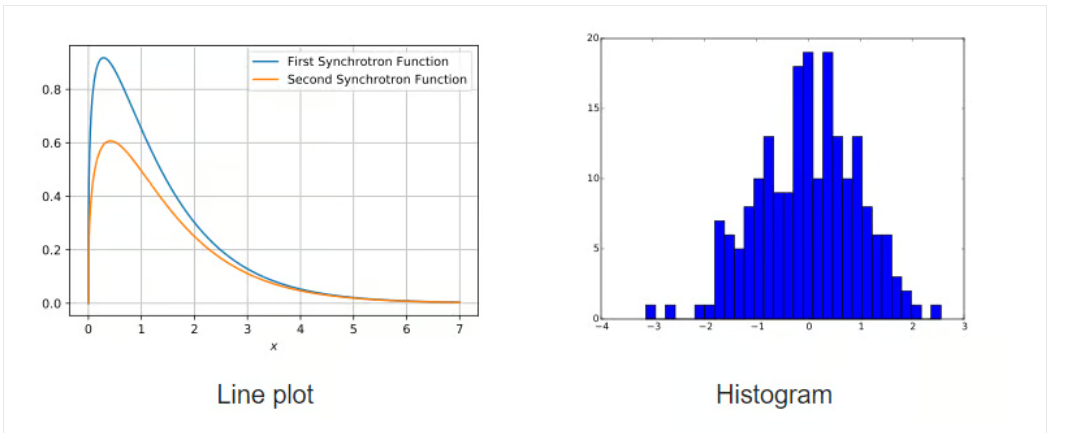
Matplotlib is a long-running library for creating static, interactive, and animated visualizations in Python. Many third-party packages build on top of it, including higher-level plotting interfaces like Seaborn and HoloViews.
Matplotlib was made to make plotting in Python more like MATLAB, and it's completely open source. It can make a variety of different kinds of charts, like scatter plots, histograms, bar charts, error bars, box plots, and more. A lot of everyday plotting can be done in just a few lines, especially once your data is already in NumPy arrays or pandas DataFrames.
5. Seaborn
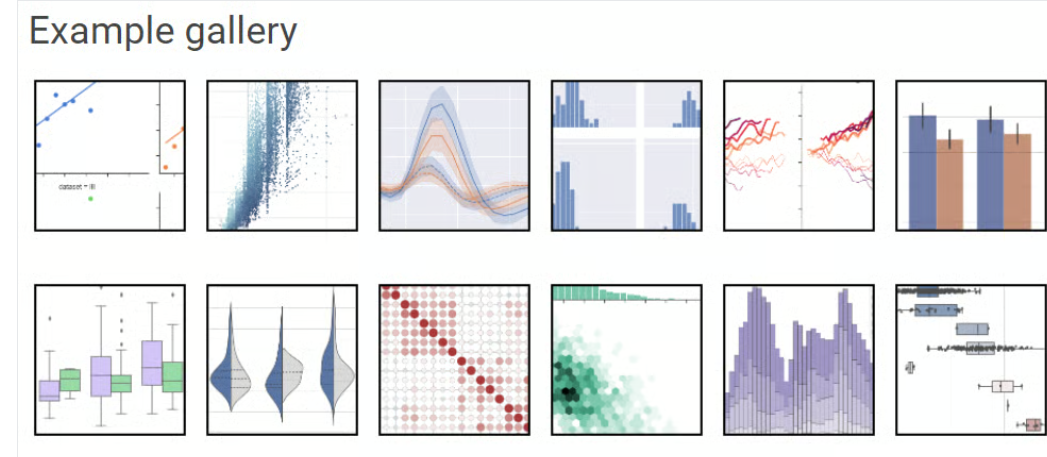
Seaborn is a Matplotlib-based visualization library that focuses on statistical graphics and cleaner defaults. It’s tightly integrated with NumPy and pandas data structures, which makes it easy to visualize distributions, relationships, and grouped comparisons directly from DataFrames.
A big part of Seaborn’s appeal is that it treats visualization as part of analysis, not a separate “final step.” Its plotting functions work well when you’re trying to understand the shape of your data quickly, then refine a chart later if needed.
6. Plotly
Plotly is a popular open-source graphing library used to build interactive visualizations. The Python package is built on top of plotly.js and can render charts in notebooks, export to HTML, and power web apps through Dash.
It includes dozens of chart types, scatter, line, histogram, bar, pie, box, and 3D charts, plus options like contour plots that aren’t always as convenient in other libraries. If you need zooming, hover tooltips, toggles, or dashboard-style interactivity, Plotly is often a better fit than purely static plotting tools.
7. Scikit-Learn
Machine learning in Python is hard to separate from scikit-learn. Built on NumPy, SciPy, and Matplotlib, scikit-learn is an open-source library (BSD license) that provides a broad toolbox for predictive modeling.
It began as a Google Summer of Code initiative in 2007 and has since grown into a community-driven endeavor that gets money from both institutions and individuals. One of its best features is how easy it is to use: it has consistent APIs, excellent defaults, and a simple process.
Here’s a small example using linear regression on the diabetes dataset:
import numpy as np
from sklearn import datasets, linear_model
from sklearn.metrics import mean_squared_error, r2_score
# Load the diabetes dataset
diabetes_X, diabetes_y = datasets.load_diabetes(return_X_y=True)
# Use only one feature
diabetes_X = diabetes_X[:, np.newaxis, 2]
# Split the data into training/testing sets
diabetes_X_train = diabetes_X[:-20]
diabetes_X_test = diabetes_X[-20:]
# Split the targets into training/testing sets
diabetes_y_train = diabetes_y[:-20]
diabetes_y_test = diabetes_y[-20:]
# Create linear regression object
regr = linear_model.LinearRegression()
# Train the model using the training sets
regr.fit(diabetes_X_train, diabetes_y_train)
# Make predictions using the testing set
diabetes_y_pred = regr.predict(diabetes_X_test)
8. Streamlit
Static reports aren’t the only deliverable anymore. Streamlit transforms Python scripts into an engaging web application quickly without requiring HTML/CSS/JavaScript. It’s widely used to create internal tools, and model demos that stakeholders can actually click through.
With simple functions like st.write() and st.slider(), Flask developers can develop interfaces that update as the user changes their instructions, particularly essential when you want to prototype speedily.
9. Pydantic
Pydantic started as a web-focused utility, but it’s become a major part of modern AI and data pipelines. It handles data validation and settings management using Python type hints. In practice, that means you can define a strict schema and reliably coerce messy inputs (or model outputs) into structured Python objects.
That matters a lot in LLM applications, where you often get JSON-like output that isn’t always clean. Pydantic helps enforce consistent shapes and types so downstream code doesn’t fall over when a field is missing or formatted oddly.
List of Machine Learning Python Libraries
10. LightGBM
If you're dealing with large datasets and want a smart way to build solid models quickly, LightGBM is worth a look. One of the most recognized and widely adopted machine learning libraries, gradient boosting, helps developers build advanced algorithms by relying on decision trees and reworked foundational models. Because of this, dedicated libraries make it possible to apply the approach in a fast and practical way.
At its core, LightGBM does what gradient boosting does best builds models in stages, each one fixing the errors of the last. But what sets it apart is how it handles data. It splits trees leaf-wise instead of level-wise, which gives it an edge in accuracy without bogging down performance.
Why people use it: It's built for speed, works well on distributed systems, and can crank through high-dimensional data like it’s nothing.
What’s good:
- Training is quick, even on huge datasets
- Uses less memory compared to similar tools
- Solid accuracy out of the box
- Supports distributed learning, GPUs, and parallel training
- Handles both classification and regression
What’s not so good:
It’s so good at fitting your data that it can sometimes overdo it especially if you’re working with a smaller dataset. You’ll want to tune it carefully or throw in some regularization.
The lightgbm model has found its way into all kinds of real-world workflows, especially where time and memory are tight. From recommender systems to click-through rate prediction, it's been tested in production and held up well.
11. XGBoost
Then there’s XGBoost. It’s been a staple in the machine learning world for years, and for good reason. Short for “Extreme Gradient Boosting,” this library came onto the scene with a focus on efficiency, portability, and flexibility, and it delivered.
What you get with XGBoost is a tried-and-tested boosting framework that’s been used by teams competing (and winning) on Kaggle, especially for structured data tasks. The code runs on pretty much any platform you throw at it, Windows, Linux, OS X, and works well in the cloud too.
It uses a form of parallel tree boosting (GBDT) that makes it possible to build fast, accurate models that scale up when you need them to. Whether you're doing classification, regression, or ranking, it’s up for the job.
Advantages:
- Strong community support
- Works on everything from your laptop to massive distributed clusters
- Cloud-ready
- Production-proven by big names in tech
- Supports regularization to prevent overfitting
Like LightGBM, XGBoost is open-source and licensed under Apache. If you’re diving into data science or building production ML pipelines, this one’s probably already on your radar. There’s also a great tutorial floating around if you’re just starting out or want to understand it better.
12. CatBoost
CatBoost is a fast and practical gradient boosting library based on decision trees, used for ranking, classification, regression, and other machine learning tasks. The catboost library works with Python, R, Java, and C++, and it can train on both CPU and GPU.
It grew out of Yandex’s MatrixNet work, so it fits ranking problems, forecasting tasks, and recommender systems quite naturally. Because it handles categorical data well and doesn’t force you into endless manual encoding, people use it across many industries, from click-through prediction to risk scoring.
If you skim through their docs, you’ll see they highlight things like:
- Strong performance on many real datasets compared with other gradient boosting tree tools
- Fast prediction once the model is trained
- Support for both numerical and categorical features out of the box
- Solid GPU support when you need extra speed
- Plotting and interpretation utilities for digging into model behavior
- Distributed training through Apache Spark, CLI tools, and integration with Scikit-learn
13. Scikit-learn
Scikit-learn is basically the standard toolbox for classical machine learning in Python. It’s free, open source, and covers classification, regression, clustering, model selection, naive Bayes, gradient boosting, K-means, preprocessing, and more, all under a consistent API that most practitioners pick up early.
To install and use Scikit-learn, you need:
Python (>= 2.7 or >= 3.3)
NumPy (>= 1.8.2)
SciPy (>= 0.13.3)
You’ll find it underneath plenty of well-known products. Spotify, for example, has used it for parts of their recommendation stack, and Evernote for different classifier pipelines. If NumPy and SciPy are already on your machine, a quick pip install of scikit-learn usually does the job.
14. RAPIDS.AI cuDF and cuML
RAPIDS is a collection of open-source GPU-focused libraries that let you run analytics and data science workflows directly on GPUs. It can scale from a single-GPU workstation up to multi-GPU, multi-node clusters with Dask and leans on tools like Numba and Apache Arrow.
cuDF is a GPU DataFrame library for loading, joining, aggregating, filtering, and transforming tabular data. It uses an Apache Arrow-style columnar layout and offers a pandas-like interface, so data scientists and engineers can keep familiar idioms while getting large speedups.
cuML is the machine learning part of RAPIDS: a group of libraries that implement algorithms and math primitives with APIs that feel similar to Scikit-learn, so you can move traditional tabular ML workloads onto GPUs without a complete rewrite.
15. TensorFlow
If you’ve ever wondered is TensorFlow a library or framework, you’re not alone. Technically, it’s a framework, but it behaves a lot like a library in how it’s used. It’s modular, importable, and gives you the tools to build everything from simple linear regressions to full-blown neural networks. You can work at the high level using Keras or dig deep into custom training loops and graph manipulation.
TensorFlow is built for production use at scale. It supports training on CPUs, GPUs, and TPUs, and it's flexible enough for both research and deployment. You’ll find it powering applications in healthcare, finance, recommendation systems, natural language processing, and more.
It includes a variety of components, such as:
- TensorFlow Hub for reusable modules
- TensorFlow Serving for model deployment
- TensorFlow Lite for mobile
- TensorFlow Extended (TFX) for end-to-end pipelines
So while it’s often referred to as a library in casual conversation, its full suite of tools and integrated architecture make it more accurately a deep learning framework. It’s more than just a collection of functions, it’s an ecosystem.
16. Optuna
The optuna library is a powerful tool for hyperparameter optimization. It’s Python-based, open-source, and designed to simplify the process of tuning models. Instead of manually adjusting values and running experiments over and over, Optuna handles the trial and error for you. It figures out what’s working, what’s not, and adjusts accordingly all while pruning dead-end runs to save time.
It uses Python’s native syntax to define the search space, which means no awkward config files or DSLs to learn. You can easily integrate it with popular machine learning frameworks like PyTorch, TensorFlow, LightGBM, and XGBoost. And if you're working on large datasets or need to scale up, Optuna makes it easy to parallelize your experiments.
Some of the standout features from the official documentation:
- Lightweight, fast, and flexible design
- Intuitive Pythonic API for search spaces
- Efficient sampling algorithms
- Built-in support for parallel execution
- Tools for visualizing performance and optimization history
Whether you’re tuning a small model or managing hundreds of experiments, the optuna library streamlines the entire process, freeing you up to focus on what actually matters.
Automated Machine Learning (AutoML) Python Libraries
17. PyCaret
PyCaret is a widely used open-source library that streamlines machine learning work in Python with very little code. It provides an end-to-end flow for model building and experiment management, helping you move from data to results faster.
Compared with many other libraries, PyCaret takes a low-code route that can shrink what would normally be a long script into just a few lines. That makes it handy for quick baselines, rapid comparisons, and iterative experiments.
18. H2O
H2O is a machine learning and predictive analytics platform aimed at building models on big data and taking them into production. It’s used in settings where scale, repeatability, and enterprise deployment matter.
The core codebase is written in Java. Its algorithms use the Java Fork/Join framework for multi-threading and sit on top of H2O’s distributed Map/Reduce framework.
H2O is licensed under the Apache License, Version 2.0, and offers APIs for Python, R, and Java. For details on H2O AutoML, refer to the official documentation.
19. Auto-sklearn
Auto-sklearn is an automated machine learning toolkit designed to act as a practical substitute for a typical scikit-learn model. It handles algorithm selection and hyperparameter tuning automatically, which can save a lot of time during model development. Its approach reflects advances in meta-learning, ensemble building, and Bayesian optimization.
Built as an add-on to scikit-learn, auto-sklearn uses Bayesian Optimization to search for a strong-performing pipeline for a given dataset. It’s simple to use and supports supervised classification and regression.
import autosklearn.classification
cls = autosklearn.classification.AutoSklearnClassifier()
cls.fit(X_train, y_train)
predictions = cls.predict(X_test)
20. FLAML
FLAML is a lightweight Python library that automatically finds accurate models while keeping compute needs modest. It selects learners and hyperparameters for you, which helps reduce tuning time. According to its GitHub repository, FLAML:
- Finds quality models quickly for classification and regression with low resources.
- Supports deep neural networks as well as classical machine learning methods.
- Can be customized or extended.
- Provides fast automatic tuning, including constraints and early stopping.
It’s particularly useful when you need a quick, reasonable model under tight runtime limits too. With only a few lines of code, you can get a scikit-learn style estimator.
from flaml import AutoML
automl = AutoML()
automl.fit(X_train, y_train, task="classification")
21. AutoGluon
While many AutoML libraries emphasize speed, AutoGluon (developed by Amazon) leans toward robustness and strong accuracy. It’s known for “multi-layer stack ensembling,” which can outperform manually tuned models on tabular benchmarks.
AutoGluon also supports multimodal problems, so you can train one predictor on data that includes text, images, and numeric columns, without heavy feature engineering. It includes presets that balance training time and accuracy, and it generally produces a ready-to-use predictor with sensible defaults.
The snippet below shows the basic syntax, and it fits nicely in automated machine learning python workflows:
from autogluon.tabular import TabularPredictor
predictor = TabularPredictor(label='class').fit(train_data)
# AutoGluon automatically trains, tunes, and ensembles multiple models
Deep Learning Python Libraries
22. TensorFlow
TensorFlow is a widely used open-source library for fast numerical computing, created by the Google Brain team, and it’s been a core tool in deep learning research for years.
On the official site, TensorFlow is described as an end-to-end open-source machine learning platform. It comes with a broad set of tools, libraries, and community-backed resources that help researchers and developers build, train, and ship ML models.
Why TensorFlow became such a common choice:
- You can build models without a lot of friction.
- It supports heavy numeric workloads at scale.
- Strong API coverage, with both low-level and high-level stable APIs in Python and C.
- Straightforward deployment and compute options on CPU and GPU.
- Includes ready-to-use datasets and pre-trained models.
- Pre-trained model support for mobile, embedded, and production use.
- TensorBoard for logging, visualization, and experiment tracking during training.
- Works smoothly with Keras (TensorFlow’s high-level API).
23. PyTorch
PyTorch is a machine learning framework built to shorten the path from research experiments to real production deployment. It’s an optimized tensor library for deep learning on GPUs and CPUs, and it’s often treated as the main alternative to TensorFlow. Over time, its popularity has climbed enough to surpass TensorFlow on Google Trends.
Originally developed and maintained by Facebook, PyTorch is available under the BSD license.
PyTorch include:
- Easy switching between eager execution and graph-based workflows using TorchScript, plus quicker production rollout with TorchServe.
- Distributed training support and performance tuning for both research and production through the torch.distributed backend.
- A strong ecosystem of libraries and tools for computer vision, NLP, and related areas.
- Broad support across the major cloud platforms.
24. FastAI
FastAI is a deep learning library built around high-level building blocks that help you reach strong results quickly, while still offering lower-level pieces you can swap out to try new ideas. The goal is to give you speed and flexibility without making the workflow harder than it needs to be.
Features:
- A type dispatch system for Python, paired with a semantic type hierarchy for tensors.
- A GPU-optimized computer vision library that stays fully extendable in pure Python.
- An optimizer setup that extracts shared behavior across modern optimizers into two core parts, so new optimizers can be written in about 4–5 lines of code.
- A two-way callback system that can read and modify any part of the model, data pipeline, or optimizer at any moment during training.
25. Keras
Keras is a deep learning API built for humans first. It leans on best practices that reduce mental overhead: consistent, simple APIs; fewer steps for common tasks; and error messages that actually tell you what to do next. It became so widely used that TensorFlow adopted it as the default API starting in the TF 2.0 release.
Keras makes it easy to express neural networks, and it includes strong tooling for model development, dataset handling, graph visualization, and more.
Features:
- Runs well on both CPU and GPU.
- Supports most common neural network building blocks, including convolutional, embedding, pooling, recurrent, and more—plus you can combine them into larger architectures.
- Modular design makes it flexible and expressive for research and experimentation.
- Easy to debug, inspect, and iterate as you go.
26. PyTorch Lightning
PyTorch Lightning adds a high-level interface on top of PyTorch. It’s lightweight, fast, and designed to organize your code so research logic is separated from engineering details making experiments easier to understand, rerun, and share. It was built to help deep learning projects scale cleanly across distributed systems.
Lightning is framed around spending more time on research and less time wiring things together. With a small refactor, you can:
- Run the same code across different hardware setups.
- Profile training slowdowns and system bottlenecks.
- Use model checkpointing.
- Train with 16-bit precision.
- Scale to distributed training.
27. JAX
JAX is a high-performance numerical computing library from Google. If PyTorch is the friendly go-to for everyday deep learning work, JAX is the “race car” many researchers (including DeepMind) reach for when they need maximum speed. It can take NumPy-style code and compile it to run efficiently on accelerators (GPUs/TPUs) using XLA (Accelerated Linear Algebra).
One of its biggest draws is automatic differentiation on native Python functions, which makes it especially useful for building new methods from the ground up, particularly in generative modeling and physics-heavy simulations.
Python Libraries for Natural Language Processing
28. spaCy
spaCy is an industrial-strength open-source NLP library for Python. It’s especially good at large-scale information extraction, and it’s written from the ground up with carefully managed memory in Cython. If your system needs to chew through massive web dumps efficiently, spaCy is often one of the first tools people reach for.
Features:
- Supports both CPU and GPU workflows.
- Works across 66+ languages.
- Includes 73 trained pipelines covering 22 languages.
- Multi-task learning using pre-trained transformer models like BERT.
- Pretrained word vectors.
- Very fast runtime.
- Training system designed with production use in mind.
- Components for NER, POS tagging, dependency parsing, sentence splitting, text classification, lemmatization, morphology, entity linking, and more.
- Can integrate custom TensorFlow and PyTorch models.
- Built-in visualizers for syntax and NER.
- Model packaging, deployment, and workflow management support.
29. Hugging Face Transformers
Hugging Face Transformers is an open-source library from Hugging Face that makes it simple to download, fine-tune, and use modern pre-trained models. Using these models can save a lot of training time and compute, cut costs, and reduce the need to build everything from scratch. The model catalog supports multiple modalities, including:
- Text: classification, information extraction, Q&A, translation, summarization, and text generation in 100+ languages.
- Images: image classification, object detection, segmentation.
- Audio: speech recognition, audio classification.
- Multimodal: table question answering, OCR, document extraction, video classification, visual question answering.
Transformers also plugs cleanly into the three biggest deep learning stacks: PyTorch, TensorFlow, and JAX. You can train in one framework and run inference in another, and each transformer architecture is defined as a standalone Python module, making it easier to tweak for experiments.
The library is available under the Apache License 2.0.
30. LangChain
LangChain is one of the most used orchestration frameworks for Large Language Models (LLMs). It helps developers connect components together for example, wiring an LLM (like GPT 5.2) to external tools, data sources, or other steps in a workflow.
It reduces the overhead of managing prompts and chaining steps, and it makes it easier to build agent-style systems that can call tools (like calculators, search, or a Python REPL) to handle multi-step tasks. LangChain is one of the most used orchestration frameworks for Large Language Models (LLMs). It helps LangChain developers connect components together
from langchain.chains import LLMChain
# Example: build a simple chain that formats input
# and routes it through an LLM to an output parser
chain = prompt | llm | output_parser
result = chain.invoke({"topic": "Data Science"})
Wrap Up
Python in 2026 isn’t short on options, it’s spoiled for choice. The good news is you don’t need to chase every new package to build solid AI and data workflows. You just need a dependable core stack that fits your workload.
For most developers, that foundation still starts with NumPy and pandas for day-to-day number crunching and data cleanup. When datasets grow, and speed becomes a real constraint, Polars is often the practical upgrade. On the visualization side, Matplotlib remains the workhorse, Seaborn provides quick statistical clarity, and Plotly earns its place when stakeholders need interactive charts they can actually explore.
For machine learning, scikit-learn is still the default toolset for classical modeling and clean pipelines, while XGBoost, LightGBM, and CatBoost continue to dominate structured data problems where accuracy and performance matter. Deep learning is still led by PyTorch and TensorFlow, and tools like Optuna, AutoGluon, PyCaret, and FLAML cut down the time spent tuning and comparing models. For language-heavy systems, spaCy, Transformers, and LangChain cover everything from extraction to modern LLM workflows.
If you’re building something in 2026, select library based on your data size, your deployment reality, and what your developers can maintain not what’s trending this week. Want a stack recommendation tailored to your project? Reach out to Amrood Labss, and we’ll help you choose the right libraries and get moving faster.